
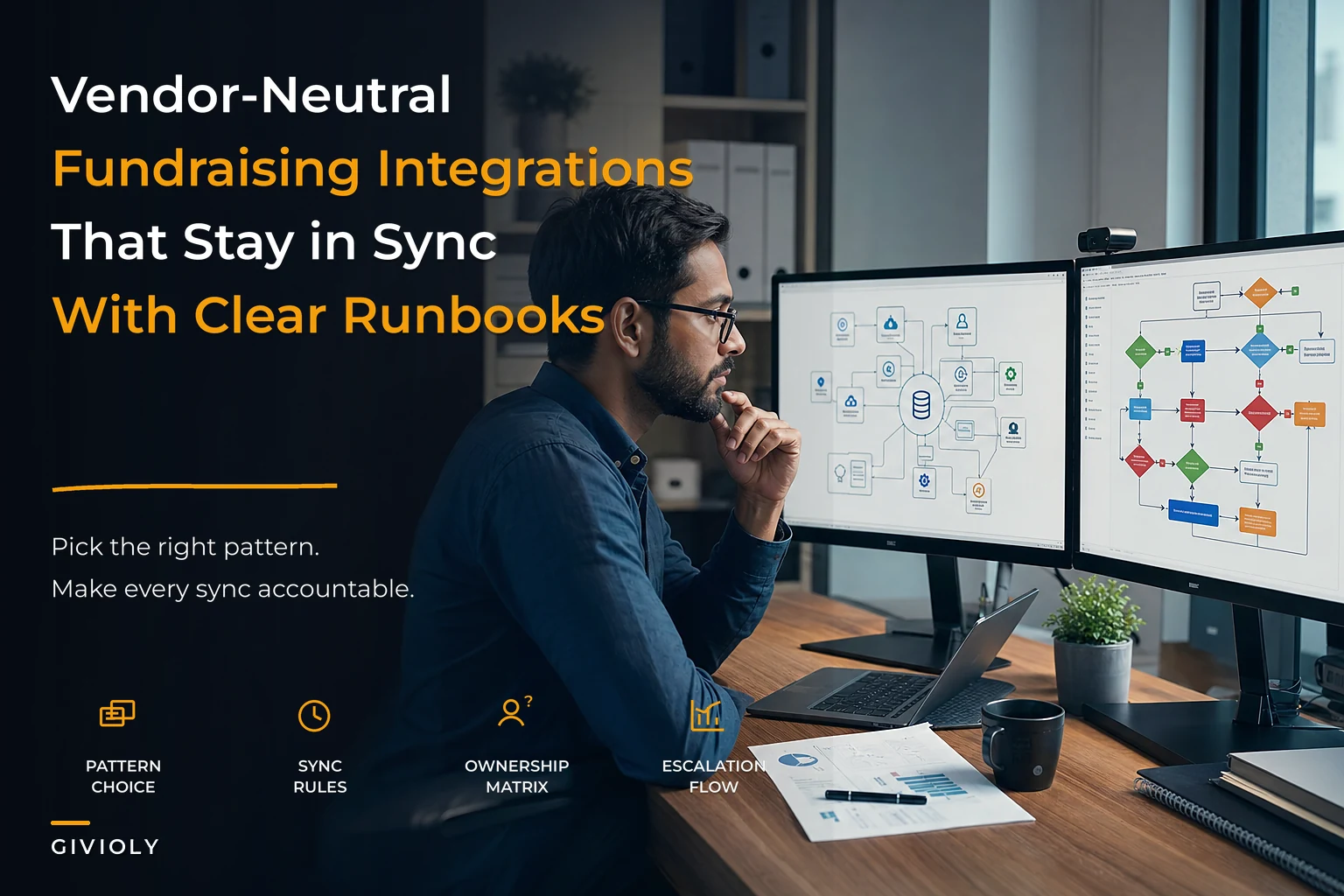

The nonprofit sector runs on a patchwork of specialized tools. Your CRM holds donor records, your email platform manages campaigns, your payment processor handles transactions, your accounting software tracks finances — and somewhere in between, critical donor data gets lost, duplicated, or stuck in manual export-import cycles that eat up hours of staff time every week.
Small organizations start with one or two tools, add more as they grow, and suddenly find themselves managing five to eight different platforms that each hold a piece of the donor puzzle. Staff members become human middleware, manually moving data between systems, catching errors when they can, missing them when they can't.
The real operational cost isn't just the time spent copying and pasting. It's the missed opportunities when a major donor's giving history doesn't sync to your email platform, so they receive the wrong ask amount. It's the compliance risk when restricted fund data sits in spreadsheets instead of flowing properly to your accounting system. And it's the donor frustration when a monthly giving update doesn't propagate correctly and they get charged the wrong amount.
Understanding Integration Patterns: What Actually Works in Practice
One-Way Sync Patterns
The simplest integration pattern pushes data from a source system to a destination without expecting anything back. Think of your donation form pushing completed transactions to your CRM, or your CRM pushing new donor records to your email marketing platform.
-
Data flows in a clear direction (donations → accounting)
-
The source system is the obvious "system of record"
-
You don't need real-time updates in both directions
-
Your team size is under 10 people
The challenge emerges around data conflicts. When someone updates a donor's email address in your email platform, that change doesn't flow back to your CRM. Over time, you end up with different versions of the truth across systems, and nobody notices until it causes a real problem.
Middleware and iPaaS Solutions
Middleware platforms like Zapier, Make (formerly Integromat), or more robust solutions like Workato sit between your systems and translate data back and forth. They act as universal translators, taking donor data from your CRM's format and reshaping it for your email platform's requirements.
-
You're managing 4–8 different tools
-
Your team has basic technical skills but no developers
-
You need conditional logic (if donation > $1,000, then...)
-
You're processing somewhere between 500 and 5,000 transactions monthly
Real middleware implementations tend to start simple and then quietly get complicated. A nonprofit might begin with a basic "new donation → create contact" workflow, then add gift acknowledgment triggers, recurring payment updates, campaign attribution tracking — and suddenly they're managing 40+ automation workflows that nobody fully understands anymore. It creeps up on you.
Event-Driven Architecture
Event-driven patterns treat each significant action as a trigger for multiple downstream processes. A single donation event might trigger: CRM record creation, email acknowledgment, accounting entry, board dashboard update, and a monthly giving enrollment check — all at once.
-
You process high donation volumes (1,000+ monthly)
-
Real-time acknowledgment matters for donor experience
-
You have technical staff or consultants available
-
Multiple systems need the same data simultaneously
The operational risk with event-driven systems is cascade failures. One broken integration can create a backlog of thousands of unprocessed events, and untangling that mess requires technical expertise most small nonprofits don't have in-house.
Priority Matrix by Organization Size
Organizations Under $500K Annual Revenue
Simplify donor management and fundraising workflows.
Givioly helps you organize campaigns, engage donors, and maximize fundraising impact seamlessly.
- Unified donor profiles
- Real-time donation tracking
- Automated impact reporting
No credit card required
Critical Integrations:
-
Donation form → CRM (donor records)
-
CRM → Email platform (basic segmentation)
-
Payment processor → Accounting (financial reconciliation)
Nice to Have:
-
Email → CRM (engagement tracking)
-
CRM → Board reporting dashboard
Skip for Now:
-
Marketing attribution tracking
-
Advanced donor journey automation
-
Multi-channel campaign orchestration
At this size, focus on eliminating the most painful manual processes. If someone spends three hours weekly doing donation reconciliation, that's your first integration priority. Don't chase sophisticated attribution models when you're still manually entering checks.
Organizations $500K–$2M Annual Revenue
Critical Integrations:
-
All payment channels → CRM (unified donor view)
-
CRM ↔ Email platform (two-way sync)
-
CRM → Accounting (grant tracking)
-
Donation forms → Tax receipt system
Growing Priority:
-
Event registration → CRM
-
Volunteer management → CRM
-
Wealth screening → CRM
-
Peer-to-peer fundraising → CRM
Emerging Needs:
-
Marketing attribution
-
Donor journey automation
-
SMS/text messaging integration
Organizations at this level typically have 2–5 fundraising staff juggling multiple campaigns at once. Integration priorities shift toward coordination and preventing dropped balls rather than just saving time.
Organizations Over $2M Annual Revenue
Foundation Layer:
-
Complete bi-directional CRM sync with all donor-facing systems
-
Real-time payment processing across all channels
-
Automated financial reconciliation with tagged funds
-
Multi-channel communication orchestration
Scale Enablers:
-
Predictive analytics integration
-
Advanced segmentation and personalization
-
Cross-functional workflow automation
-
Comprehensive attribution tracking
Risk Management:
-
Audit trail preservation
-
Data governance workflows
-
Backup and recovery systems
Larger organizations face complexity multiplication. A university with 20+ departments each running their own campaigns, using overlapping but not identical tech stacks, isn't dealing with a technical problem anymore — it's a governance problem. Integration at that scale is as much about standardization as it is about connectivity.
Sync Frequency Rules That Actually Matter
Transaction Data
Payment data should sync as close to real-time as feasible. A donor who just gave $5,000 shouldn't receive a generic "please donate" email two hours later because systems haven't caught up. Aim for transaction sync within 5–15 minutes.
Contact Updates
Donor contact information can typically sync daily without any real operational impact. The exception: email unsubscribes and deceased flags, which should propagate within an hour to prevent embarrassing or harmful communications.
Engagement Metrics
Email opens, clicks, and website behavior can batch process nightly for most organizations. Unless you're running sophisticated real-time nurture campaigns, daily sync is plenty for decision-making.
Financial Reconciliation
Despite what software vendors claim, most nonprofits still reconcile finances monthly. Daily sync to accounting provides a useful safety net, but don't architect your entire integration strategy around real-time financial reporting that nobody actually uses.
Campaign Performance
Weekly sync usually suffices for campaign metrics and attribution data. Most nonprofits review campaign performance weekly or monthly anyway. Over-engineering real-time dashboards that refresh every minute wastes resources when a weekly report would serve the same purpose.
Vendor Selection Checklist for Integration Success
Choosing fundraising technology based on features without considering integration capabilities creates future operational headaches. Every vendor claims to integrate with everything — the details are what determine whether those integrations actually work.
API Assessment:
-
Does the vendor provide a documented REST API?
-
Are there rate limits that would restrict your usage?
-
Can you access all the data fields you need?
-
Is webhook support available for real-time events?
-
How does the vendor handle API versioning and deprecation?
Pre-Built Integration Quality:
-
Which specific systems have native integrations?
-
Are integrations maintained by the vendor or third parties?
-
Can you customize field mappings?
-
How are sync conflicts resolved?
-
What happens when integrations fail?
Data Access and Export:
-
Can you schedule automated exports?
-
What formats are supported (CSV, JSON, XML)?
-
Is there a complete data dictionary available?
-
Can you access historical data through the API?
-
Are there restrictions on data export volume?
Middleware Compatibility:
-
Is there a Zapier/Make/Workato app available?
-
How complete is the middleware integration?
-
Who maintains the middleware connector?
-
Are there known limitations?
Validate middleware connector completeness with a short pilot integration before assuming full parity with your current systems.
Total Cost of Integration:
-
Additional fees for API access?
-
Charges for data export?
-
Premium tier requirements for integration features?
-
Third-party connector costs?
-
Potential consulting fees for setup?
One pattern worth flagging: nonprofits choose a new CRM with a beautiful interface and solid features, only to discover six months later that connecting it to their payment processor requires a $10,000 custom development project. Always validate integration capabilities against your existing mission-critical systems before committing to anything new.
Sample Runbooks for Common Integration Scenarios
Runbooks transform integration chaos into predictable operations. Instead of scrambling when something breaks, your team follows documented procedures that actually resolve the problem.
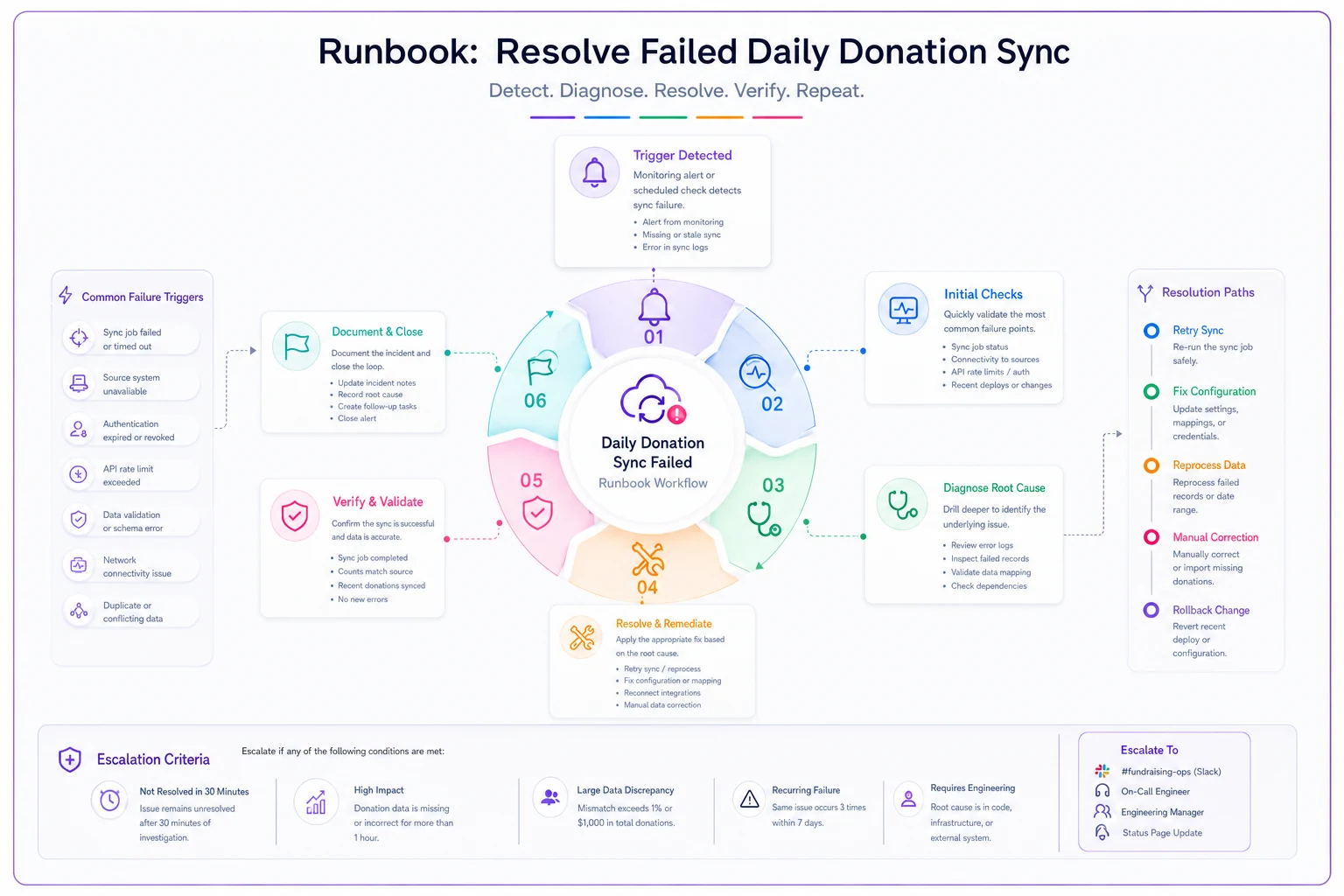
Runbook: Daily Donation Sync Failure
Detection Trigger:
-
No new donations in CRM by 10 AM
-
Sync error notification from middleware
-
Accounting team flags missing transactions
Initial Response (5 minutes):
-
Check payment processor dashboard for actual donations
-
Verify middleware platform is running
-
Check for any system maintenance notices
-
Document number of affected transactions
Diagnosis Phase (15 minutes):
-
Test API connectivity
Run manual sync for single test record
-
Check authentication
Verify API keys haven't expired
-
Review error logs
Look for specific field-level failures
-
Identify pattern
Are all donations failing or specific types?
Resolution Paths:
Path A — Authentication Issue:
-
Regenerate API keys in source system
-
Update middleware configuration
-
Test with single transaction
-
Run full sync for missing period
-
Verify in downstream systems
Path B — Field Mapping Error:
-
Identify problematic field (often custom fields)
-
Temporarily disable field in sync
-
Process backlog without problematic field
-
Create ticket for permanent fix
-
Document workaround for team
Path C — Rate Limit/Volume Issue:
-
Reduce batch size in middleware
-
Implement sync queuing
-
Process in smaller chunks
-
Monitor for completion
-
Adjust permanent settings
Verification:
-
Confirm transaction count matches
-
Spot-check 3–5 random donations
-
Verify restricted funds tagged correctly
-
Check acknowledgment emails sent
-
Update incident log
Escalation Triggers:
-
Cannot resolve within 2 hours
-
More than $50,000 in affected donations
-
Major donor transactions affected
-
Month-end/year-end processing period
-
Audit or compliance implications
Runbook: Duplicate Donor Record Merge
Detection Methods:
-
Staff reports duplicate acknowledgments
-
Email platform shows multiple records for same address
-
Donor complains about multiple communications
-
Regular deduplication scan finds matches
Pre-Merge Verification:
-
Confirm both records represent the same person
-
Check for different household members
-
Review transaction history on both records
-
Identify primary/survivor record
-
Document merge decision rationale
Merge Execution Process:
-
Export both complete records for backup
-
Capture donation totals separately
-
Note any restricted fund associations
-
Save communication preferences
-
Document recurring gift settings
System-by-System Updates:
CRM (Primary):
-
Execute merge using native functionality
-
Verify combined giving history
-
Check preserved relationships
-
Confirm communication preferences
-
Add merge note to record
Email Platform:
-
Suppress duplicate record
-
Update remaining record with latest preferences
-
Check segment membership
-
Verify automation enrollment
-
Test with single send
Payment Processor:
-
Update customer ID references
-
Verify recurring gifts still active
-
Check payment method associations
-
Confirm receipt settings
Accounting System:
-
Update donor mapping tables
-
Verify historical transactions intact
-
Check restricted fund associations
-
Run reconciliation report
-
Document for auditor
Post-Merge Validation:
-
Send test acknowledgment
-
Verify appears once in reports
-
Check monthly giving still processing
-
Confirm segments calculate correctly
-
Monitor for 30 days
Runbook: Emergency Communication Suppression
Immediate Actions (2 minutes):
-
Pause all scheduled email campaigns
-
Disable donation acknowledgment automation
-
Stop any running SMS campaigns
-
Halt direct mail exports
-
Notify entire fundraising team
System Shutdown Sequence:
-
Email platform
Pause all campaigns and automations
-
CRM
Flag affected records with "DO NOT CONTACT"
-
Payment processor
Disable receipt emails
-
Event platform
Cancel confirmations
-
Phone system
Add to suppression list
Investigation Process:
-
Identify scope of issue
-
Determine affected donor count
-
Pull samples of incorrect communications
-
Document root cause
-
Create remediation plan
Gradual Restart Protocol:
-
Fix underlying issue
-
Test with internal seed list
-
Send apology if appropriate
-
Resume transactional messages first
-
Restart marketing communications last
Learning Loop:
-
Document what triggered the issue
-
Update monitoring to catch it earlier
-
Add to pre-send checklist
-
Train team on warning signs
-
Update runbook with lessons learned
Use the diagram above as a quick reference during incidents; follow the detection steps first, then move through diagnosis and resolution paths before verifying and escalating as needed.
Integration Ownership Matrix
Clear ownership prevents integration from becoming everyone's problem and therefore nobody's responsibility.
| Integration | Primary Owner | Backup Owner | Escalation Path | Review Cycle |
|---|---|---|---|---|
| Donation Form → CRM | Development Ops | Database Admin | Director of Development | Monthly |
| CRM → Email Platform | Marketing Coordinator | Development Ops | Director of Marketing | Weekly |
| Payment → Accounting | Finance Manager | Development Ops | CFO | Daily |
| CRM → Board Dashboard | Database Admin | Development Analyst | VP Development | Quarterly |
| Email → CRM (activity) | Marketing Coordinator | Database Admin | Director of Development | Monthly |
| Event Reg → CRM | Events Manager | Database Admin | Director of Events | Per Event |
| Wealth Screen → CRM | Prospect Research | Database Admin | VP Development | Quarterly |
| Grant System → Accounting | Grants Manager | Finance Manager | CFO | Monthly |
Ownership doesn't mean doing all the work — it means ensuring the integration stays functional and serves its purpose. The Development Ops person might not write the code for the donation form integration, but they're responsible for noticing when donations stop flowing and coordinating the fix. Without clear ownership, small integration failures quietly become big operational ones.
When Integration Complexity Becomes a Liability
There's a tipping point where integration complexity starts hurting more than helping. Nonprofits running 50+ Zapier workflows that nobody fully understands — where making a simple field change requires three days of impact analysis — aren't uncommon. It happens gradually, and by the time it's a problem, the system is already deeply embedded.
Warning signs of over-integration:
-
Nobody knows all your integration points
-
Simple changes require multi-day planning
-
Debugging takes longer than manual processes would
-
New staff can't learn the system
-
Vendors blame each other for problems
The solution usually isn't fewer integrations — it's better architecture. Consolidating around a true system of record, implementing proper error handling, and maintaining documentation prevents integration sprawl from becoming operational chaos. AI-powered operational platforms can help reduce this complexity by providing intelligent middleware that understands nonprofit data patterns, dynamically routing data based on content and context, and catching errors before they cascade through your systems.
Building Versus Buying Your Integration Layer
Small nonprofits consistently underestimate the true cost of building custom integrations. That "simple" API connection between your CRM and email platform turns into ongoing maintenance, security updates, error handling, monitoring, and documentation — none of which anyone budgeted for.
The build decision makes sense when you have genuinely unique requirements that no existing solution addresses. A university with complex multi-campus attribution needs might justify custom development. A community foundation with standard donor management needs should buy or configure existing solutions.
Consider the total operational cost:
-
Initial development (internal or consultant)
-
Ongoing maintenance and updates
-
Documentation and training
-
Error handling and monitoring
-
Security and compliance updates
-
Vendor API changes and versioning
-
Staff knowledge transfer
For most nonprofits under $10M in annual revenue, the operational burden of custom integrations exceeds the benefits. Modern integration platforms and AI-enhanced operational software provide the flexibility you need without the maintenance overhead.
Making Integration Decisions That Scale
Your fundraising tech stack integration roadmap should anticipate growth without over-engineering for a future that might never arrive. The nonprofit that grows from $500K to $5M over five years needs different integration architecture than one that stays stable at $1M for a decade. Build for where you are, with a clear sense of where the pressure points will emerge.
Start with integration patterns that match your current operational capacity. If you have one part-time database person, complex event-driven architectures will likely fail regardless of their theoretical benefits.
Focus first on eliminating the highest-friction manual processes. If your team spends 10 hours weekly on donation reconciliation but only 2 hours on email segmentation, prioritize the payment integration even if the email work seems more interesting. Operational impact beats technical elegance every time.
Document everything, but keep documentation simple enough that people actually use it. A one-page runbook that gets followed beats a 50-page manual that collects dust.
Whether you're managing integration through spreadsheets and Zapier or working with more robust middleware, the principles stay the same: clean data flows, predictable error handling, and documentation your team will actually maintain.
The most successful nonprofits treat integration as an ongoing operational responsibility, not a one-time technical project. They build systematic approaches to connecting systems, establish clear ownership and escalation paths, and measure success by what actually gets done more reliably — not by how sophisticated the architecture looks on a whiteboard.
Ready to elevate your fundraising efforts?
Join 2,000+ nonprofits using Givioly to save time, increase donations, and build lasting donor relationships.