



Three weeks into January, and your finance director is still matching December donations. Your CRM shows $847,000 raised. QuickBooks says $823,000. The bank statements add up to $831,000. Meanwhile, your development team keeps logging thank-you calls for gifts that finance claims don't exist yet.
The monthly reconciliation scramble that happens everywhere
This mess isn't unique to your organization. It's not because people are careless, either. Most donation reconciliation workflows are built backwards—starting with accounting requirements instead of how gifts actually move through your systems.
Nonprofits try to force completely different gift types through identical monthly processes. A $50 online donation travels through your systems nothing like a $25,000 pledge payment. Yet most organizations reconcile them identically, then wonder why nothing balances.
Why normal business reconciliation fails for fundraising
Your accounting team learned reconciliation from standard business practices—match deposits to invoices, tie everything to the general ledger, close books monthly. Works great for consulting firms or retail stores. Nonprofits operate differently.
Simplify donor management and fundraising workflows.
Givioly helps you organize campaigns, engage donors, and maximize fundraising impact seamlessly.
- Unified donor profiles
- Real-time donation tracking
- Automated impact reporting
No credit card required
You're dealing with multiple entry points. Online donations hit Stripe or PayPal instantly. Check deposits lag by days or weeks. Wire transfers appear without warning. Stock gifts arrive through third-party brokers. Each path creates its own data trail, timing issues, and mismatch potential.
The same donation gets recorded differently everywhere. Your online platform captures the full credit card charge including fees. Your CRM records the net gift amount. Your bank shows the deposit after processor delays. Your accounting system needs both gross and net for proper reporting. Four systems, four different numbers for identical gifts.
Things get messier with restricted funds, pledge payments, matching gifts, and recurring donations. One major donor might have active transactions across all categories simultaneously. Their $100,000 pledge payment gets applied to a campaign fund, triggers a corporate match arriving in 60 days, and includes a stock transfer component taking two weeks to liquidate.
When something goes wrong, you're looking at weeks of detective work. One nonprofit spent three months untangling a single quarter's mismatched pledge payments. They found $180,000 in deposited gifts never recorded in their CRM.
Gift types need completely different approaches
Online donations create volume problems
Online gifts seem straightforward until you hit scale. A mid-sized nonprofit processing 800-1200 monthly online donations faces immediate workflow challenges. Each transaction generates multiple data points across multiple systems. The donation platform records one set of information. The payment processor creates another. Your CRM needs a third configuration. Your accounting system requires specific fields missing from the other three.
-
Transaction ID (from payment processor)
-
Donation ID (from donation platform)
-
Constituent ID (from CRM)
-
Batch number (from accounting)
-
Campaign code (from fundraising)
-
Fund designation (from finance)
-
Fee amount (calculated differently by each system)
-
Net amount (payment processor version)
-
Gross amount (donation platform version)
-
Deposit date (bank timeline)
-
Gift date (donor timestamp)
Every online donation needs these eleven fields minimum. They rarely populate automatically. Your donation platform might pass six fields to your CRM. The CRM might sync four fields to accounting. Nobody captures payment processor fees correctly. Timestamp confusion alone creates hundreds of edge cases monthly.
Major gifts operate on different planets
Major gifts follow completely different timelines. A $50,000 pledge might include an initial payment in March, quarterly installments through December, and a final payment the following February. The donor specifies different designations for each payment. Some go to operations, some to capital campaigns, the last payment to endowment.
-
Original pledge amount and date
-
Payment schedule with expected dates
-
Actual payment amounts and dates
-
Designation for each payment
-
Campaign or fund allocation
-
Recognition credit rules
-
Soft credit distributions
-
Anonymous handling requirements
-
Multi-year commitment tracking
Monthly reconciliation that works for small donations completely fails here. You need quarterly or annual views to track pledge fulfillment properly. Fields that matter for credit card donations become irrelevant. Instead, you're tracking pledge balance, payment variance, and scheduled versus actual timing.
Stock gifts are valuation nightmares
Non-cash gifts create reconciliation chaos. A donor transfers stock worth $15,000 on transfer date. By liquidation time, the value is $14,200. Your CRM records the $15,000 gift value for tax receipting. Your accounting system needs both gift value and sale proceeds. The $800 difference isn't a loss—it's market fluctuation requiring its own accounting treatment.
-
Transfer date and initial valuation
-
Number of shares/units
-
Cost basis information
-
Broker or transfer agent details
-
Liquidation date and amount
-
Holding period for tax purposes
-
Appraisal documentation (for property)
-
Legal transfer documents
-
IRS Form 8283 requirements
Standard monthly reconciliation breaks completely. Some stock gifts take 2-3 weeks just to transfer. Property donations might take months to sell. You need separate workflows with different timing, different fields, and different approval processes.
Build cadence around reality, not calendar dates
The biggest mistake nonprofits make is forcing all reconciliation into monthly cycles because "that's when we close books." Gift processing doesn't follow accounting calendars.
Daily reconciliation for online gifts
Online donations need daily attention, not monthly marathons. Every morning, someone should match yesterday's online donations between your donation platform and payment processor. This takes 15-20 minutes daily. Wait until month-end and you're looking at 2-3 days of confusion.
-
Failed transactions that look successful
-
Duplicate charges needing refunds
-
Fee calculations that don't match
-
Currency conversion issues
-
Recurring donation failures
One organization switched from monthly to daily online reconciliation and discovered they were losing $3,000-4,000 monthly in failed recurring donations that appeared successful in their donation platform. Daily reconciliation let them retry these charges within grace periods instead of losing them entirely.
Here's a quick workflow diagram to visualize daily, weekly, monthly, and quarterly checkpoints across systems.
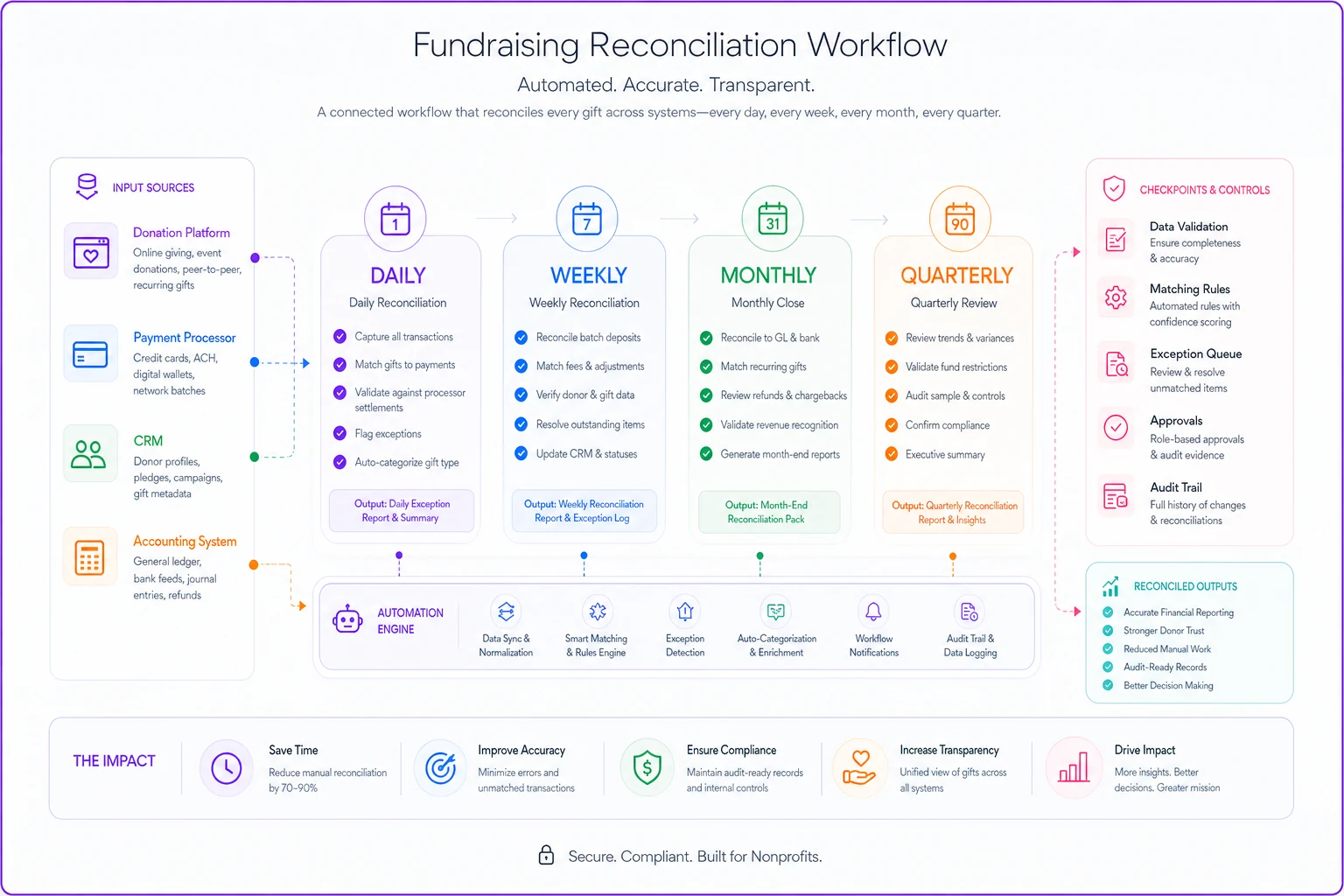
Weekly batch processing for physical gifts
Physical donations accumulate differently. Checks arrive throughout the week but get deposited in batches. Cash from events gets counted and deposited together. These need weekly processing to maintain accuracy without overwhelming staff.
-
Matching deposit slips to individual checks
-
Verifying cash counts from events
-
Entering offline gifts into your CRM
-
Generating thank-you letter queues
-
Flagging unusual or problem gifts
Weekly processing prevents month-end pile-ups that create mistakes. Staff can handle 50-75 checks weekly without stress. Push that to 200-300 at month-end and errors multiply.
Monthly verification for recurring gifts
Recurring donations need monthly review separate from regular reconciliation. You're not just matching transactions—you're monitoring health metrics:
-
Success rate trends
-
Failed payment patterns
-
Upgrade/downgrade activity
-
Cancellation timing
-
Payment method expiration
Monthly review catches systemic issues before they become major problems. One nonprofit discovered their recurring donation failure rate jumped from 4% to 11% over two months. The cause? Their payment processor changed retry logic without notice. Monthly monitoring caught this early enough to recover most lost revenue.
Quarterly deep-dive for major gifts
Major gifts and pledges need quarterly reconciliation with deeper analysis:
-
Pledge payment compliance
-
Multi-year commitment tracking
-
Restricted fund verification
-
Board-designated allocation review
-
Campaign progress validation
Quarterly timing aligns with donor communication cycles and board reporting. It's frequent enough to catch issues but not so frequent that you're constantly disrupting relationship management activities.
Templates that actually work
Templates beat complex procedures every time. But you need different templates for different gift types, not one master spreadsheet trying to do everything.
Online gift reconciliation template
Your online gift template should be simple with exactly the fields you need:
| Date | Platform ID | Processor ID | Donor Name | Gift Amount | Fees | Net Amount | Matched? | Notes |
|---|---|---|---|---|---|---|---|---|
| 3/15 | DON-8847 | ch_1K7x4B | Sarah Mills | $100.00 | $3.20 | $96.80 | Yes | |
| 3/15 | DON-8848 | ch_1K7x9C | Anonymous | $50.00 | $1.75 | $48.25 | Yes | |
| 3/15 | DON-8849 | Failed | Tom Chen | $200.00 | $0.00 | $0.00 | No | Retry pending |
This template works because it matches exactly what staff see in their systems. No calculated fields, no complex formulas, just raw data needed for matching.
Keep the online template free of calculated fields to avoid sync errors between systems.
Pledge payment tracking template
Pledge tracking needs completely different structure:
| Donor | Pledge Total | Paid to Date | Balance | Next Payment | Expected Date | Last Contact | Status |
|---|---|---|---|---|---|---|---|
| Johnson Foundation | $100,000 | $50,000 | $50,000 | $25,000 | 4/15 | 3/28 email | On track |
| Smith Family Trust | $75,000 | $25,000 | $50,000 | $25,000 | 4/1 | 3/15 call | Payment pending |
| ABC Corporation | $50,000 | $50,000 | $0 | Complete | N/A | 3/20 thank you | Fulfilled |
This template focuses on payment compliance and relationship management, not transaction matching. The fields help development and finance teams coordinate outreach before payments are due.
Stock gift processing template
Non-cash gifts need extensive documentation:
| Donor | Transfer Date | Shares | Symbol | Transfer Value | Sale Date | Sale Proceeds | Gain/Loss | Status |
|---|---|---|---|---|---|---|---|---|
| R. Williams | 3/1 | 100 | AAPL | $15,000 | 3/8 | $15,400 | +$400 | Complete |
| M. Patel | 3/12 | 500 | MSFT | $42,000 | Pending | Pending | TBD | Holding |
| K. Brown | 2/28 | 50 | GOOGL | $8,500 | 3/5 | $8,350 | -$150 | Complete |
This template captures both gift value for receipting and sale proceedings for accounting, maintaining audit trails for both requirements.
Where automation transforms reconciliation
Manual reconciliation workflows work, but they don't scale. Once you're processing more than 500-600 gifts monthly, manual matching becomes a full-time job. AI-powered operational software fundamentally changes what's possible.
Modern platforms automatically match transactions across your systems using pattern recognition beyond simple ID matching. The software learns your organization's specific patterns—how your payment processor formats data, which fields your CRM requires, how your accounting system categorizes gifts. Instead of manually copying data between four systems, the platform maintains synchronized records automatically.
The real value isn't just time savings, though organizations typically cut reconciliation time by 60-70%. It's error prevention. The software flags mismatches the moment they occur, not weeks later during month-end review. It identifies patterns humans miss, like gradual processing fee increases suggesting you need to renegotiate rates, or spikes in failed recurring donations from specific banks indicating systemic issues.
For complex gifts like pledges and stock transfers, the platform maintains multi-stage workflows that adjust based on gift type. It knows pledge payments need different fields than online donations, stock gifts require valuation tracking, restricted funds need additional coding. The system enforces these requirements consistently, something nearly impossible with manual processes.
Common failures and their fixes
The designation disconnect
Development records a gift as unrestricted. The donor's check memo says "Building Fund." Finance codes it to general operations. Three different designations for the same gift, and nobody catches it until audit season. This happens because designation info lives in too many places—the donation form, the CRM record, the thank-you letter, the accounting entry.
Fix: Create single source of thought for designations. Pick one system (usually the CRM) as the master designation record. Everything else pulls from there. No exceptions, no manual overrides without documentation.
The soft credit spiral
A board member solicits a $25,000 corporate gift. Development gives them soft credit. The corporation wants recognition for the CEO personally. You add another soft credit. The matching gift program triggers, creating more soft credits. Suddenly, your reports show $100,000 raised when only $25,000 came in.
Fix: Separate hard credits (actual money) from soft credits (recognition) in all reconciliation workflows. Only hard credits matter for financial reconciliation. Soft credits are exclusively for development reporting. Never mix them in the same reports or templates.
The restricted fund maze
Restricted gifts create endless confusion. A donor gives $50,000 restricted to youth programs. Finance deposits it all to general fund because "we'll track it in the GL." Development thinks it went to campaign fund. Program staff believe it's available immediately. Nobody agrees on what "youth programs" actually means.
Fix: Document restricted fund definitions before accepting gifts. Create restricted gift intake forms requiring finance, development, and programs to agree on designation, timeline, and allowable expenses. No restricted gift gets processed without this documentation.
Quarterly audit-ready checkpoints
Instead of scrambling during audit season, build quarterly checkpoints that keep you audit-ready year-round. Each quarter, run these validations:
Q1 Checkpoint (April):
-
Verify all year-end gifts are properly receipted
-
Confirm pledge payment schedules for the year
-
Review and update recurring gift payment methods
-
Clear any unmatched transactions from Q4
Q2 Checkpoint (July):
-
Audit restricted fund balances and spending
-
Review soft credit policies and cleanup
-
Verify all stock gifts are properly valued and sold
-
Match development and finance campaign totals
Q3 Checkpoint (October):
-
Test year-end giving platform capacity
-
Update signature authorities and approvals
-
Review and document any policy changes
-
Prepare preliminary audit schedules
Q4 Checkpoint (January):
-
Final year-end receipt verification
-
Complete pledge payment reconciliation
-
Document any write-offs or adjustments
-
Prepare full audit package
These quarterly reviews catch issues while they're still fixable. More importantly, they distribute audit prep work throughout the year instead of creating a massive January crisis.
Implementation timeline that works
Month 1-2: Stabilize daily operations
Start with daily online gift reconciliation. Get this working smoothly before tackling anything else. Create your online gift template, assign responsibility, establish morning routines. You'll see immediate accuracy improvements and catch problems faster.
Month 3-4: Add weekly check processing
Layer in weekly batch processing for physical donations. Build check logging templates and establish deposit procedures. Train backup staff so processes don't break when someone's out sick.
Month 5-6: Implement major gift tracking
Develop pledge tracking systems and templates. Work with development to ensure they're updating payment expectations. Start quarterly reviews of major gift payments and restrictions.
Month 7-8: Integrate non-cash gifts
Build workflows for stock and property donations. Create relationships with preferred brokers and establish liquidation policies. Document valuation procedures for audit purposes.
Month 9-12: Refine and automate
With manual processes stable, identify automation opportunities. This is when AI-powered operational software delivers maximum value—you know exactly what needs automating because you've run the manual version successfully.
The reconciliation workflow foundation works at any scale, but the tools need to evolve. What handles $2 million raised annually breaks at $10 million. The $10 million system fails at $50 million. The principles remain constant though. Match gift types to appropriate workflows. Establish cadences based on volume and complexity, not arbitrary calendar dates. Use templates capturing exactly what you need, nothing more. Build checkpoint systems catching errors early.
Stop treating reconciliation as back-office burden. It's the foundation of donor trust. Every matched transaction represents a promise kept to someone who believed in your mission enough to invest in it.
The audit isn't the goal—it's just validation that you're doing daily work right.
Ready to elevate your fundraising efforts?
Join 2,000+ nonprofits using Givioly to save time, increase donations, and build lasting donor relationships.