


Picture walking into a finance committee meeting where a board member asks about the MacArthur Foundation grant spending. Your program director confidently reports $47,000 spent on youth programming. Finance shows $31,000. The funder's portal says you've drawn down $52,000.
Three different numbers. One very uncomfortable silence.
This happens in nonprofits every week. Not because people aren't tracking expenses—they're tracking them three different ways in four different systems with zero common language between teams.
The Hidden Architecture of Grant Tracking Failures
Most nonprofits think their restricted funds tracking problems stem from not having sophisticated enough accounting software. After watching dozens of organizations struggle through this, the software is rarely the core issue. Program staff and finance teams operate in completely different realities.
Your program manager tracks activities and outcomes. They think in terms of "workshop supplies" and "facilitator fees." Finance thinks in account codes like 5210 and 6140. When an invoice for $3,400 comes in for "youth program materials," the program manager allocates it to the summer camp grant. Finance splits it across three different funding sources based on the general budget allocation formula they've been using since 2019.
By month three of the grant period, you're looking at a $15,000–20,000 discrepancy that nobody can explain without diving through hundreds of transactions. Both teams are technically correct based on their own tracking methods.
Grant compliance isn't just about spending the right amount. Federal grants require you to track indirect costs at specific rates. Foundation grants often restrict certain expense categories entirely. Government contracts might allow equipment purchases but only under $5,000 per item. Miss any of these details and you're facing anything from repayment demands to losing future funding eligibility.
Building a Tagging Schema That Both Teams Actually Use
The first step to fixing this mess isn't buying new software or hiring more staff. You need a common language—a tagging schema that makes sense to everyone involved.
Simplify donor management and fundraising workflows.
Givioly helps you organize campaigns, engage donors, and maximize fundraising impact seamlessly.
- Unified donor profiles
- Real-time donation tracking
- Automated impact reporting
No credit card required
Start with grant identifiers that humans can actually remember. Instead of "FY24-DOE-7829474," use "ED-Literacy-2024." Your program staff will actually use tags they can pronounce.
Each grant then needs three classification layers:
Primary grant identifier: ED-Literacy-2024
Program area: Adult-Education
Expense category: Direct-Program
Most organizations mess up by creating 47 different expense categories trying to capture every possible nuance. Your teen photography workshop supplies end up tagged as "Youth-Creative-Arts-Supplies-Consumable-Direct" and nobody remembers if video equipment goes under "Creative-Arts" or "Digital-Media."
Keep expense categories under 12 total.
Keep expense categories under 12 total. Yes, twelve. Not twelve per grant, twelve total across your entire organization. Every additional category multiplies your reconciliation complexity exponentially.
A working schema looks something like:
| Category | What Goes Here | Common Confusions to Clarify |
|---|---|---|
| Personnel-Direct | Salaries directly working on grant activities | Include benefits, exclude admin time unless specifically allocated |
| Personnel-Support | Admin, finance, operations supporting the grant | Must track time percentages for federal grants |
| Program-Supplies | Consumable materials for activities | Food only if specifically allowed, no office supplies |
| Professional-Services | Contractors, consultants, trainers | Legal/accounting usually goes to indirect |
| Technology | Software, hardware, licenses | Check dollar thresholds for equipment vs supplies |
| Occupancy-Direct | Space costs directly tied to programming | Usually requires square footage calculations |
| Travel | Mileage, lodging, transportation | Per diem rates vary by funder |
| Marketing | Outreach, recruitment, promotion | Some funders prohibit, others require |
You need decision rules for edge cases documented upfront. When a $2,400 laptop gets purchased for the literacy program but will also support other activities, where does it go? When your program coordinator spends three days at a conference that benefits multiple grants, how do you split the travel costs?
Document these decisions in a shared guide that both finance and program staff can access. Update it monthly as new edge cases emerge. Within three months, you'll have covered 90% of your regular transactions.
The Budget-to-Expense Reconciliation That Actually Works
Traditional reconciliation involves finance sending a budget vs. actual report that program staff can't decipher, followed by three weeks of emails trying to figure out why the numbers don't match anyone's expectations.
Instead, implement a rolling reconciliation process that catches mismatches before they compound.
Every Monday, generate what I call a "tag audit report"—any transaction over $500 that lacks complete tagging, plus any transaction where the grant tag doesn't match an active grant in your system. This usually catches about 15–20 transactions per week in a mid-sized nonprofit doing $2–3 million annually.
Here's a visual of the weekly tag audit and reconciliation workflow.
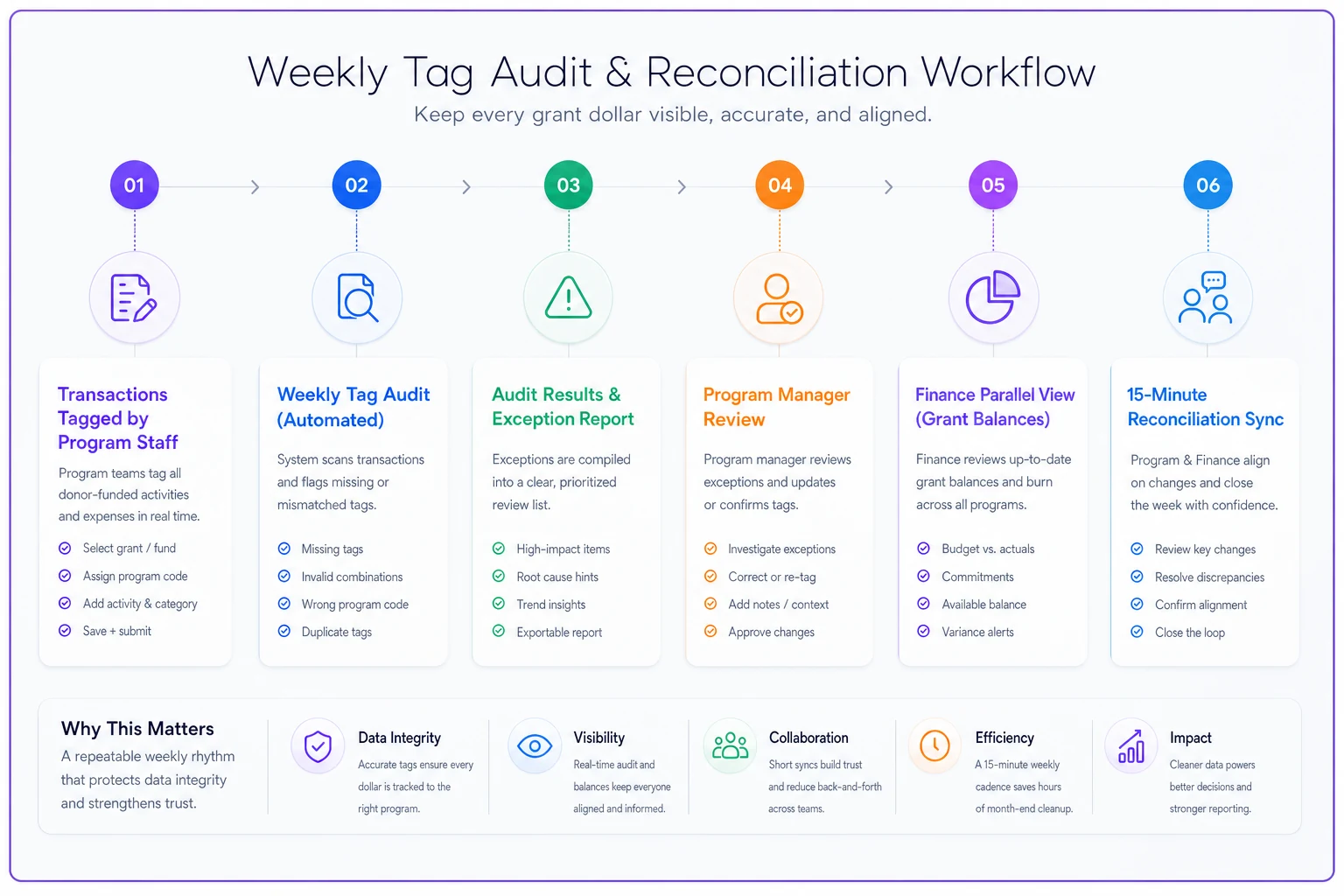
Program managers review their tagged expenses weekly using a simple three-column format:
-
What we planned to spend this week
-
What actually got tagged to our grant
-
What's still pending or miscategorized
Finance maintains a parallel view showing:
-
Available balance per grant
-
Burn rate trending
-
Upcoming large expenses flagged by programs
The magic happens in a 15-minute weekly sync where you reconcile these two views. Not a long meeting with presentations. Just 15 minutes comparing numbers and fixing mismatches while they're fresh.
One education nonprofit I worked with had chronic problems with their federal Title I grant tracking. They'd regularly discover $30,000–40,000 discrepancies during quarterly reports. After implementing weekly tag audits, their largest discrepancy in six months was $3,200—caught and fixed within days instead of months.
Creating a Reporting Cadence That Prevents Surprises
The typical nonprofit reporting cycle: panic at month-end, bigger panic at quarter-end, absolute chaos at year-end. Program staff scramble to justify expenses. Finance scrambles to move costs between grants. Everyone scrambles to create reports for funders.
A functional reporting cadence flips this model entirely.
Weekly (5 minutes per grant):
-
Tag audit clearance
-
Quick balance check
-
Flag upcoming large expenses
Bi-weekly (15 minutes per grant):
-
Burn rate analysis
-
Variance explanation for anything over 10%
-
Reallocation needs identified
Monthly (30 minutes per grant):
-
Formal budget vs. actual by category
-
Narrative updates on spending patterns
-
Compliance checkpoint review
Quarterly (2 hours total):
-
Funder report preparation
-
Full reconciliation with documentation
-
Forecast adjustments
The bi-weekly check is where you catch problems before they become disasters. A youth services organization discovered they were burning through their transportation budget at 140% of plan just six weeks into their grant period. Catching it early meant they could adjust their field trip schedule instead of scrambling to move expenses at year-end.
Your reporting packet should include three perspectives:
The Program View: Activities completed, participants served, outcomes achieved, with spending as context
The Finance View: Budget vs. actual, burn rate, compliance metrics
The Funder View: Their specific template populated with your data
Most organizations only create the funder view at reporting time, which means nobody internally knows if you're on track until it's too late to adjust.
Who Owns What (And Why It Matters)
The fastest way to tank restricted funds tracking? Make it nobody's explicit job.
Your program managers think finance owns expense tracking. Finance thinks programs own grant compliance. Development thinks they're done once the grant is won. Meanwhile, $50,000 of questionable expenses pile up because everyone assumed someone else was watching.
Clear ownership prevents this:
Program Managers own:
-
Tagging expenses at point of purchase request
-
Weekly review of their grant transactions
-
Narrative explanations for variances
-
Identifying reallocation needs early
Finance owns:
-
Maintaining the tagging schema
-
Generating audit reports
-
Ensuring correct indirect cost rates
-
Final compliance verification
Development owns:
-
Documenting funder restrictions clearly
-
Communicating reporting deadlines
-
Flagging unusual compliance requirements
-
Managing funder amendments
The controversial part: give program managers read-only access to actual financial records for their grants. Not summary reports, actual transaction-level data. Yes, they might see salary information. Yes, they might question indirect cost allocations. But transparency prevents way more problems than it creates.
The Technology Stack That Supports Without Overwhelming
You don't need a $50,000 grant management system to track restricted funds properly. But you do need systems that talk to each other without constant manual intervention.
Core accounting system with multi-dimensional tagging (not just classes or departments—actual flexible tags)
Expense management where employees can tag expenses at submission, not three weeks later when finance processes them
Reporting dashboard that both program and finance staff can access without needing accounting credentials
Document management for grant agreements, reports, and backup documentation linked to specific grants
The integration points matter more than the individual systems. When someone submits a $1,200 invoice for printing, they should tag it to the specific grant immediately. That tag should flow through approval, into accounting, and onto reports without anyone re-entering information.
About 60% of the organizations I see struggling with restricted funds tracking have all the right software but none of it connected. They're downloading from one system, uploading to another, and wondering why nothing reconciles.
Modern AI-powered operational platforms can help here by automatically suggesting tags based on vendor patterns and descriptions. When invoices from your regular printing vendor come in, the system learns they usually go to marketing grants. When your youth program coordinator's credit card charges show up, it suggests the active youth grants. Not perfect automation—you still review everything—but it catches the obvious patterns that eat up 70% of your tagging time.
Catching Compliance Issues Before They Become Findings
Audit findings for restricted funds typically fall into three categories: unallowable costs charged to grants, indirect costs calculated incorrectly, or documentation missing for expenditures.
You can prevent most of these with systematic checks built into your weekly process.
Create compliance triggers in your tagging schema. Any expense tagged as "Marketing" to a federal grant triggers review, since many federal grants restrict marketing expenses. Any equipment purchase over $5,000 triggers capitalization review. Any consultant payment over $600 triggers W-9 verification.
One homelessness services organization avoided a massive audit finding by catching that their cleaning supplies—tagged as "Program-Supplies"—were actually facility maintenance costs that should have been indirect. The difference? About $8,000 of questioned costs that would have put their entire $300,000 HUD grant at risk.
Your monthly compliance check should verify:
-
All personnel costs have proper time documentation
-
Indirect costs match your approved rate
-
No explicitly prohibited expenses hit restricted grants
-
Cost sharing commitments are being met
-
All expenses over your threshold have proper documentation
This takes roughly an hour per month for a typical grant portfolio of 8–10 active grants. Compare that to the 40–60 hours of panic-driven work when auditors find issues.
The Real Cost of Getting This Wrong
Poor restricted funds tracking doesn't just risk audit findings. It destroys program planning, damages funder relationships, and creates unnecessary organizational stress.
A workforce development nonprofit learned this the hard way. They had a $400,000 federal grant with strict spending categories. Because their tracking system couldn't differentiate between types of training expenses, they overspent their curriculum development budget by $38,000 while underspending direct training by nearly the same amount.
The funder rejected their reallocation request because it came after the fact. They had to cover the $38,000 from unrestricted funds—money earmarked for expanding their youth program. The youth program got cut, three staff positions got reduced, and their next federal grant application scored lower due to the compliance issue.
All because they couldn't track which training expenses went to which category in real time.
Making This Sustainable
The system described here takes about 3–4 hours per week of total organizational time once it's running smoothly. The setup requires more—roughly 20–30 hours to build your schema, train teams, and work through initial kinks.
Start with your newest grant or your most restrictive grant. Get the process working for one before expanding. Within three months, you should have all active grants integrated into the system.
The sustainability secret: make the process easier than the alternative. If program managers can check their grant balance in 30 seconds versus waiting three days for a finance report, they'll use the system. If tagging expenses at submission prevents hours of reconciliation later, people will do it.
Most importantly, celebrate the catches. When someone flags a miscategorized expense early, acknowledge it. When the monthly reconciliation shows everything matching, point it out. Building a culture where accurate tracking is valued matters more than any particular software or process.
The goal isn't perfect tracking—it's good enough tracking that happens consistently. A 95% accurate system used every week beats a theoretically perfect system that only gets updated quarterly.
Your funders don't expect perfection either. What they expect is that you know where their money went, you spent it according to their restrictions, and you can show your work. A solid tagging schema, regular reconciliation, and clear reporting cadence delivers exactly that.
Ready to elevate your fundraising efforts?
Join 2,000+ nonprofits using Givioly to save time, increase donations, and build lasting donor relationships.