

Most small development teams don't have a research problem. They have a filtering problem. There's already a spreadsheet somewhere with 400 names on it — event guests, lapsed donors, LinkedIn contacts, board member referrals — and no reliable way to decide who actually deserves a phone call this month.
Enterprise wealth screening tools solve part of this, but they run anywhere from a few thousand to tens of thousands a year, plus setup time you don't have. If you're a two- or three-person shop, that math rarely works. So the research either doesn't happen, or it happens randomly whenever someone has a free afternoon. This is a playbook for doing prospect research at a small nonprofit with mostly free sources, a set of ready-to-use Boolean queries, and a triage matrix simple enough that a part-time gift officer can actually run it every week. No black-box "capacity scores." Just a repeatable way to sort a big messy list into call now, nurture, and not yet.
Start with the list you already have, not a purchased one
Before touching any external database, pull your own data. The highest-signal prospects at almost every small nonprofit aren't strangers — they're people already sitting in your CRM who nobody has ever really looked at closely.
A typical pattern: a donor gives $250 at an event, then $250 again the next year, then $500 the year after. Nobody notices because $500 doesn't trip any major-gift alarm. But three years of increasing gifts, unsolicited, from someone who also opens every email — that's a warmer lead than a stranger with a $2M house.
So the first pass is internal. Export everyone with any of these signals:
-
Gave in 2+ of the last 3 years
-
Increased their gift amount at any point
-
Attended an event and gave separately (not just bought a ticket)
-
Has a soft credit / matching gift on file (signals an employer that gives)
-
Opens or clicks email consistently
That list — usually a few dozen to a couple hundred names for a small org — is your starting pool. External research isn't for finding new people. It's for enriching the people you already have enough context on to trust.
If your stages and handoffs aren't defined yet, it's worth reading how to design an operational donor lifecycle system first, because prospect research without a clear "what happens after we identify someone" step just produces a list that dies in a spreadsheet.
Free and inexpensive data sources that actually pull their weight
You don't need twelve tools. You need three or four that each answer a specific question. Here's what we'd actually use, and what each is genuinely good for.
Simplify donor management and fundraising workflows.
Givioly helps you organize campaigns, engage donors, and maximize fundraising impact seamlessly.
- Unified donor profiles
- Real-time donation tracking
- Automated impact reporting
No credit card required
| Source | Cost | Best for | Watch out for |
|---|---|---|---|
| SEC EDGAR full-text search | Free | Insider stock holdings, exec compensation for public company employees | Only public companies; won't catch private wealth |
| County property assessor sites | Free | Property ownership + assessed value | Assessed ≠ market value; homestead-only in some states |
| ProPublica Nonprofit Explorer | Free | Someone's own foundation, or their giving as a board member | Only shows 990-reported giving |
| FEC individual contributions | Free | Political giving as a proxy for capacity + willingness to give | Political ≠ charitable interest, use carefully |
| LinkedIn (free tier) | Free | Job title, employer, seniority, career trajectory | Rate-limited; don't scrape |
| Google + Boolean | Free | Bios, board memberships, obituaries (for bequest context) | Time sink without good queries |
| A light paid tool (e.g., single-seat screening) | ~$100–300/mo | Batch appends when your list crosses a few hundred | Easy to overpay for features you won't use |
The mistake teams make constantly is buying the paid tool first and never learning the free sources underneath it. When the subscription lapses or the budget gets cut, the entire research function disappears because nobody knows how to pull a property record manually anymore. Build the free-source muscle first. Add the paid append later, only when volume justifies it.
One underrated source: obituaries and local business journal "40 under 40" or "power players" lists. These tell you who's connected, who just had a liquidity event, and who's socially prominent — context that no wealth screen surfaces cleanly.
Ready-to-use Boolean queries
Boolean search is the free-tier gift officer's actual superpower, and almost nobody on a small team uses it well. These are queries you can adapt by swapping the name, city, or employer.
Find someone's board memberships and civic involvement:
"Firstname Lastname" (board OR trustee OR director OR "advisory") (foundation OR nonprofit OR hospital OR university)
Find their employer and role when you only have a name and city:
"Firstname Lastname" (Chicago OR "greater Chicago") (CEO OR founder OR partner OR "managing director" OR VP)
Check for their own family foundation:
"Lastname Family Foundation" OR "Lastname Foundation" site:projects.propublica.org
Property lookup shortcut when the assessor site search is clunky:
"street address" site:[yourcountyassessor.gov]
Find press mentions that signal a liquidity event (sale, IPO, big promotion):
"Firstname Lastname" (acquired OR "sold" OR IPO OR "raised" OR "appointed" OR "promoted") -jobs
LinkedIn people search for a company's leadership when prospecting corporate connections:
site:linkedin.com/in "Company Name" (CFO OR "VP finance" OR controller OR "director of")
Save these in a shared doc with the variables bracketed. The point isn't cleverness — it's that a volunteer or intern can run them in ten minutes and produce something consistent, instead of everyone Googling differently and getting wildly different depth of results.
A triage matrix that fits on one screen
Wealth screening obsesses over capacity — how much someone could theoretically give. But capacity without any relationship or affinity is just a rich stranger. In real fundraising, the prospects worth your limited hours score high on capacity, affinity, and access together.
Score each prospect 1–3 on three axes:
Capacity (ability to give)
-
1 = no evidence of major-gift ability
-
2 = some signal (property, title, past mid-level giving)
-
3 = strong signal (multiple wealth markers)
Affinity (connection to your mission)
-
1 = transactional / event-only
-
2 = repeat giver or engaged email subscriber
-
3 = personally connected to the cause, volunteer, or vocal advocate
Access (can you actually reach them)
-
1 = cold, no shared connection
-
2 = we have a warm channel but no named introducer
-
3 = a board member or staffer knows them personally
Add the three numbers. Then triage:
-
7–9 → Call now. Assign to a gift officer this week.
-
5–6 → Nurture. Move into a cultivation track; don't ask yet.
-
3–4 → Hold. Keep in the pool, revisit if a signal changes.
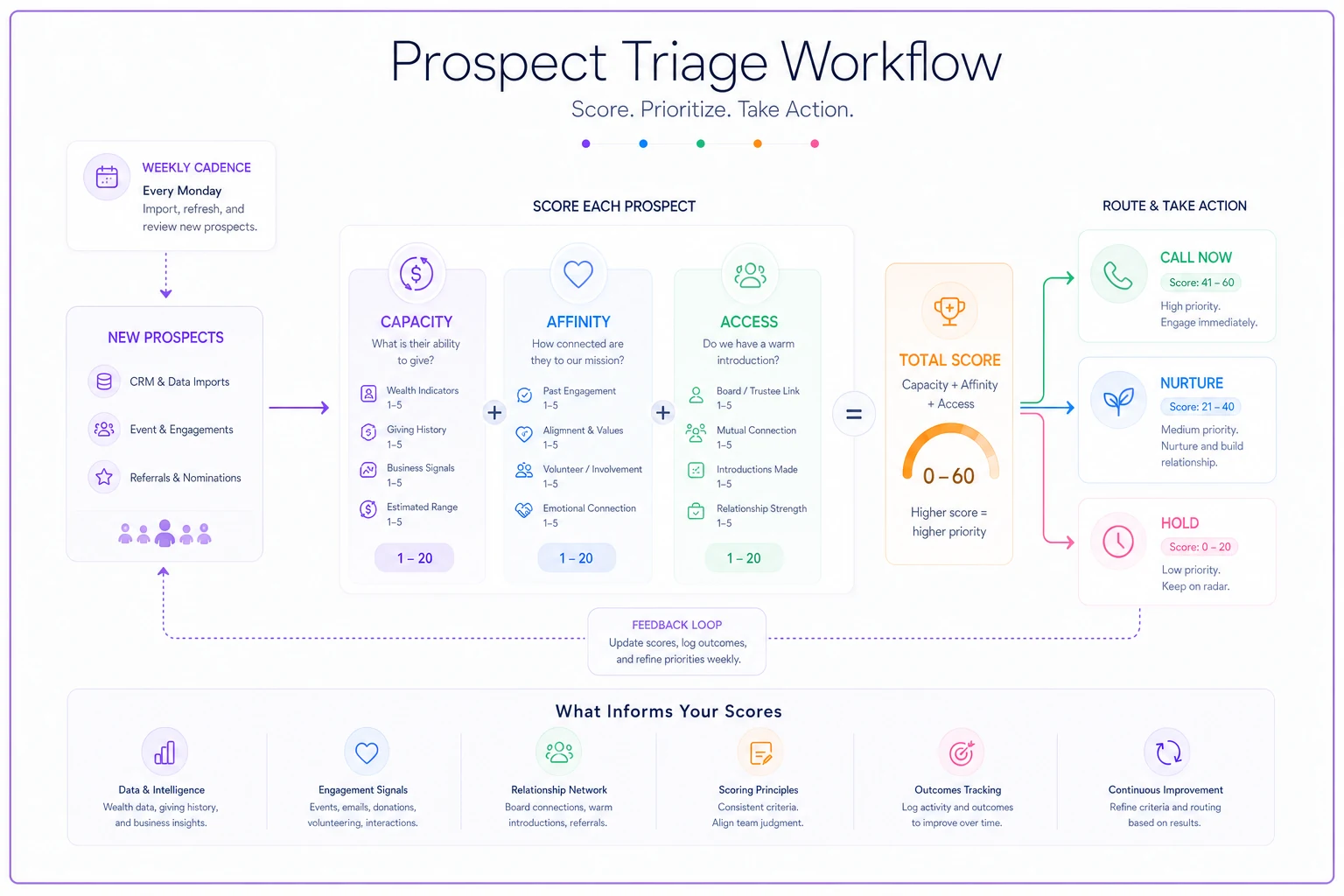
The critical insight: access is usually the bottleneck, not capacity. A team will spend hours researching a high-capacity stranger they have no way to reach, while ignoring a mid-capacity donor whose kid is on the board. Weighting access equally forces you to prioritize the prospects you can actually move.
Treat access as a gating factor — prioritize prospects you can actually reach over unreachable high-capacity strangers.
A quick note on scoring discipline — if you're layering this on top of gift metrics, keep your definitions consistent with the rest of your reporting. Our take on a pragmatic framework for nonprofit fundraising metrics and attribution covers why loose definitions quietly break every downstream number.
A weekly prospecting cadence that survives a busy season
Research dies when it's an "eventually" task. The fix is a small, boring, repeating weekly block — a couple of hours, same day each week. Here's a cadence that works for a team of one to three people.
-
Pull the week's batch (15 min). Take the next 10–15 names off your internal pool. Never try to do the whole list at once; that's how it stalls at name 40.
-
Run the free sources (60–75 min). For each name
property, EDGAR/990 if relevant, one Boolean pass for bio and board seats, LinkedIn for employer. Cap it at around 5–7 minutes per person. Depth beyond that has diminishing returns at this stage.
-
Score with the matrix (15 min). Assign capacity/affinity/access. Don't overthink it; your first instinct with the evidence in front of you is usually right.
-
Route the results (15 min). 7–9s get assigned and a task created. 5–6s go into the nurture track. 3–4s get tagged and parked.
-
Log everything in the CRM, not a side spreadsheet (10 min). This is the step everyone skips and everyone regrets.
Fifteen names a week is roughly 700 a year. Most small nonprofits don't have 700 prospects worth researching, which means this cadence will clear your entire realistic pool inside a year and then shift into re-screening mode. That's the goal — a finite, finishable process, not an endless one.
Where automation quietly helps
The manual research itself is judgment work — you shouldn't hand that to software. But the coordination around it — pulling the weekly batch, creating follow-up tasks for every 7–9 score, nudging a gift officer when a scored prospect hasn't been contacted in 30 days, flagging when a donor's giving pattern crosses a threshold — that's exactly the repetitive stuff that falls through the cracks on a small team. AI-assisted operational tools can watch for those triggers and surface tasks automatically, so the research you did in January doesn't quietly rot under a "researched" tag by March. The value isn't replacing the researcher; it's making sure nothing you found goes uncontacted.
CRM fields you need before you start
If you research 200 prospects and store the findings in a spreadsheet, you've built a liability, not an asset. The moment that person leaves, the knowledge leaves with them. Standardize a handful of fields before you begin so every researcher logs the same things.
-
ProspectCapacityScore (1–3)
-
ProspectAffinityScore (1–3)
-
ProspectAccessScore (1–3)
-
Prospect_Triage (Call now / Nurture / Hold) — auto-derived from the sum if your CRM allows
-
Research_Date (so you know when to re-screen)
-
ResearchSourceNotes (short
"property $X, board seat at Y, connected via board member Z")
-
Access_Path (who can make the introduction)
-
NextAction and NextAction_Date
Two small rules that prevent most of the mess: keep the notes field short and factual (no guessing at net worth), and always record where a fact came from. "Owns a $1.4M home per county assessor, March 2025" ages well. "Seems wealthy" does not.
A real scenario
A regional literacy nonprofit — three staff, roughly $600k annual budget — had about 260 names they considered "possible major donors," mostly event attendees and a handful of board referrals. No research process, so they were essentially guessing who to invite to coffee.
They ran the weekly cadence for about a quarter. Fifteen names a week, free sources plus a cheap single-seat screening tool for batch property and employer appends, scored with the capacity/affinity/access matrix.
Out of the 260, only about 30 scored 7–9. That was the surprise — not that some were high, but that so many they'd assumed were prospects scored 3–4 on access and affinity despite decent capacity. The team stopped chasing roughly 90 people they'd been vaguely planning to cultivate, which freed up real time.
Of the roughly 30 "call now" prospects, they got meetings with a bit over half within the first few months. It didn't produce an overnight windfall — major gifts don't work that way — but by the end of the year they'd closed a handful of four-figure gifts and one five-figure commitment from prospects the old gut-feel approach had ranked no higher than anyone else. The bigger win was subtler: they now knew why each person was or wasn't a priority, and a new hire could pick up the process without a three-week ramp.
When this approach makes sense — and when it doesn't
It makes sense when you have more names than time, a mostly manual process today, and no budget for enterprise screening. This is squarely built for teams of one to five where the constraint is hours, not data.
It's a bad idea when you haven't done the internal cleanup first. Running triage on a database full of duplicates and dead email addresses just produces confident-looking garbage. Fix the data, then research.
Who should skip this entirely: large shops that already own robust screening and have dedicated research staff. You've solved the filtering problem a different way; a lightweight matrix would just add friction. And any team without a defined follow-up process — because the fastest way to waste research is to identify great prospects and then have no one accountable for contacting them.
Prospect research at a small nonprofit isn't about having better data than the big shops. It's about a small, honest, repeatable filter that turns a pile of names into a short list you can actually act on this week — and making sure the work you did today is still driving a phone call three months from now.
Ready to elevate your fundraising efforts?
Join 2,000+ nonprofits using Givioly to save time, increase donations, and build lasting donor relationships.