



Most fundraising migration projects don't fail on go-live day. They fail three months later, when a major donor calls asking why their 12-year giving history now shows them as a first-time donor, or why their recurring gift charged twice, or why the acknowledgment letter used their spouse's name. By then the old system is gone, the vendor contract is signed, and nobody can explain what happened during the export.
That gap — between "the migration looked fine" and "the data is actually correct" — is where the real damage lives. It's almost always invisible on go-live day because the numbers add up at a high level. Total donor count matches. Total lifetime giving is close enough. Everyone claps, the project gets marked complete, and the slow rot starts underneath.
This is a blueprint for doing it the boring, disciplined way: audit before you touch anything, map every field on purpose, test against real acceptance criteria, know exactly when you'd roll back, and validate for a full 90 days after go-live instead of declaring victory in week one.
Why migrations quietly corrupt donor data (and nobody notices for months)
The core problem is that donor data isn't just rows. It's relationships between rows. A single donor record might connect to gift history, soft credits, household relationships, communication preferences, event attendance, pledge schedules, restricted fund designations, and a decade of notes typed by staff who left years ago.
When you export from System A and import into System B, the individual fields usually survive. What breaks is the connective tissue. Soft credits detach from their gifts. Household relationships collapse into duplicate individuals. Pledge balances recalculate wrong because the two systems handle "amount paid to date" differently. Constituent codes that meant "board member" in the old system get imported as free-text tags that no report will ever find again.
This pattern comes up repeatedly: migrations get scoped around the data people look at — names, addresses, total giving. Nobody scopes around the data people depend on operationally — the coded relationships, the flags that trigger stewardship, the restrictions that determine whether you can legally spend a gift. Those are the fields that silently mangle, and they're also the ones that create compliance exposure and awkward donor conversations later.
Scale makes this worse. A 2,000-record database can survive a sloppy migration because a human can eyeball problems. At 40,000+ records with fifteen years of transaction history, nobody is eyeballing anything. The errors hide in volume, and they compound every time a report gets pulled from corrupted data and a decision gets made on top of it.
The pre-migration audit: know what you have before you move it
You cannot migrate data you don't understand. Most teams genuinely don't understand their own database — not because they're careless, but because it accumulated over years of different staff, different vendors, and shifting definitions of the same field.
Simplify donor management and fundraising workflows.
Givioly helps you organize campaigns, engage donors, and maximize fundraising impact seamlessly.
- Unified donor profiles
- Real-time donation tracking
- Automated impact reporting
No credit card required
The audit isn't about tidying up. It's about creating a factual inventory of what exists, so you have something real to check the new system against. Skip this and your acceptance testing has no baseline — you'll be comparing the new system to your assumptions instead of reality.
A real pre-migration audit covers:
-
Record counts by type — constituents, organizations, households, gifts, pledges, recurring commitments, events, actions/notes. Exact numbers, pulled and dated.
-
Field-level fill rates — which fields are populated, how often, and in what format. If "phone number" has eleven different formats across 30,000 records, you need to know before you map it.
-
Coded value inventories — every dropdown, every constituent code, every gift type, every campaign/appeal/fund code, with counts per value. This is where migrations die.
-
Relationship structures — soft credits, household links, employer/employee, org affiliations. Document how each is stored, because System B almost certainly stores it differently.
-
Financial reconciliation totals — total lifetime giving, current-year giving, open pledge balances, active recurring gift value. These become non-negotiable acceptance numbers.
-
Duplicate assessment — how many likely duplicates exist now. Migrations often multiply duplicates, so you need the starting count.
-
Restricted and designated funds — every restriction, every designation, and the current balance tied to each. Getting this wrong isn't just messy, it's a compliance problem.
One thing worth flagging: audit before you clean, and audit again after you clean. A lot of teams clean data and then can't explain why the new record count doesn't match the vendor's export. If you merged 1,400 duplicates during cleanup, that needs to be documented as a deliberate change, not discovered as a mystery later.
This connects directly to having real ownership over your data definitions — the kind of thing covered in Fundraising Data Governance for Small Nonprofits, because you can't audit fields nobody has agreed on the meaning of.
Canonical mapping templates: the document that prevents most of the pain
If there's one artifact that separates clean migrations from disasters, it's the canonical mapping template. It's just a spreadsheet, but it forces every decision to be made on purpose instead of left to the import wizard's defaults.
The idea is simple: for every field in the source system, you decide exactly where it lands in the destination, how it transforms, and what happens to values that don't fit. "Canonical" means you're defining one agreed target structure — one true home for each piece of data — rather than letting each field find its own path.
A workable mapping template has these columns:
| Source field | Source example value | Target field | Transformation rule | Default / fallback | Owner | Test after import? |
|---|---|---|---|---|---|---|
const_code | "BM", "VOL", "" | Constituent Type | Map BM→Board Member, VOL→Volunteer | Leave blank if unmapped, flag for review | Data lead | Yes |
gift_type | "CK", "CC", "STK" | Gift Method | Map to standardized picklist | Reject import if unmapped | Finance | Yes |
pledge_bal | 450.00 | (calculated) | Recalculate from schedule + payments | N/A | Finance | Yes — reconcile totals |
hh_link | parent record ID | Household relationship | Rebuild as household member | Create household if missing | Data lead | Yes |
notes_free | free text | Notes/Action | Concatenate with date + author | Preserve verbatim | Program | Spot-check |
The template does three quiet but important things. First, it surfaces every coded value that has no home in the new system — those become explicit decisions instead of silent data loss. Second, it assigns an owner to each mapping, so finance owns financial fields and program owns program fields, which stops one overwhelmed admin from guessing at rules they don't understand. Third, it becomes your test script — the "Test after import?" column tells you exactly what to verify on the other side.
Assign a clear owner to each mapping column so subject-matter experts approve transformations and you avoid guesswork.
A common mistake: mapping only the fields you plan to use going forward and dropping the rest. Historical fields carry historical meaning. That old "solicitor" field might look like junk today, but if it drove attribution reporting for a decade, dropping it silently rewrites your history. Decide deliberately what to archive versus migrate — but decide, don't default.
Mapping also exposes integration dependencies fast. If your donation forms, email platform, and accounting system all read from specific fields, changing those structures breaks the downstream sync. Working through the mapping is often where teams first realize the true scope of their integration surface — which is exactly why a vendor-neutral integration roadmap matters before the move, not after.
Acceptance tests: proving the data is right, not just present
Acceptance testing is where "the import ran successfully" gets separated from "the data is actually correct." Vendors will happily give you the first while you assume you got the second.
-
Record count reconciliation — Every record type in the target matches the audited source count, adjusted for documented cleanup. Any variance must be explained line by line.
-
Financial totals reconciliation — Total lifetime giving, current-year giving, open pledge balances, and active recurring value match source within a tolerance you defined upfront. Any rounding drift must be explained.
-
Coded value coverage — Zero unmapped values silently discarded. Every source code either landed somewhere or is on a documented exception list.
-
Relationship integrity checks — Sample 50–100 records with soft credits and household links; confirm relationships survived intact. Duplicated households or detached soft credits are automatic fails.
-
Restricted fund verification — Every restricted fund balance matches. Pass/fail with zero tolerance — it's a compliance issue, not a data-quality preference.
-
Duplicate delta — Duplicate count did not increase beyond what cleanup should have reduced.
-
Round-trip spot checks — Pull 25 real donors across giving levels and manually compare their full record, source vs. target, field by field. Include your biggest and oldest donors on purpose.
-
Downstream sync test — Confirm a live gift flows correctly from the donation form through to the new system and into accounting, with the right fund and attribution.
The thing most teams miss: acceptance testing has to happen on a full trial migration, not a sample. Sample imports of 500 records almost always pass, because 500 records don't contain the edge cases living in the tail of a 40,000-record database. Corrupt data is disproportionately in old records, unusual gift types, and donors with complicated household structures. Test the whole thing or don't bother.
Rollback criteria: decide when to abort before you're emotionally invested
Nobody wants to talk about rollback. The project has a deadline, people are exhausted, the old system's contract is expiring, and there's pressure to just push through. That pressure is exactly why you define rollback criteria in advance — in writing, when you're calm — so the decision isn't made by whoever's most tired at midnight on go-live weekend.
Rollback criteria are the specific conditions under which you stop, revert to the old system, and reschedule. They should be objective enough that a stranger could read the results and know the answer.
-
Financial totals don't reconcile and the variance can't be explained and corrected within the migration window.
-
Any restricted fund balance is wrong. No exceptions — this is a legal and donor-trust issue.
-
Duplicate records increased materially and can't be resolved quickly.
-
Soft credits or household relationships failed integrity checks above your defined threshold.
-
The donation form or payment processing sync isn't working, meaning live gifts would be captured wrong or lost.
-
More than a defined percentage of coded values landed unmapped.
The practical requirement behind all of this: keep the old system live and untouched, in read-only mode, through the entire validation period. The number one reason teams can't roll back isn't that they don't want to — it's that they already decommissioned the source system to save on the license fee. Pay for the overlap. A couple months of double licensing is trivial compared to reconstructing corrupted donor history from PDFs.
When rolling back is the wrong call
Rollback isn't free either. Treating every hiccup as a rollback trigger is its own failure mode. Cosmetic issues, minor formatting inconsistencies, a handful of fixable mapping misses, cleanup you can do in-place after go-live — none of those justify aborting. The rollback line is drawn at data integrity and financial/compliance correctness, not at "the migration wasn't perfect." Perfect doesn't exist. Correct and trustworthy does.
The 90-day validation cadence: because go-live isn't the finish line
The most dangerous moment in a migration is the week after go-live, when everyone declares success and moves on. The problems that surface immediately are the easy ones. The expensive ones show up when the first month-end close runs, when the first big appeal segments its list, when the first quarterly board report pulls numbers that don't match last quarter's.
-
Week 1 Daily reconciliation of any new gifts. Confirm the donation-to-accounting flow is clean on real transactions. Watch acknowledgment letters closely — merge-field errors show up here first and donors notice immediately.
-
Weeks 2–4 Twice-weekly checks on new record creation, duplicate formation, and segmentation. Run your standard reports and compare against pre-migration equivalents.
-
Days 30–45 First full month-end reconciliation. This is the real test — financial reports, restricted fund balances, pledge aging. Compare against the old system's final month if you can.
-
Days 45–75 Weekly spot checks. Have front-line staff flag anything that looks off in daily use; they catch things reports never will, like a donor whose communication preferences didn't carry over.
-
Days 75–90 Final reconciliation and sign-off. Re-run the full acceptance test suite against production. Only now do you decommission the old system.
The reason this cadence matters is coordination, not just data. A migration touches finance, program, development, and whoever runs your email and donation forms. Each function experiences the new system on a different clock — finance at month-end, development at appeal time, program when they pull a service report. Ninety days is roughly the minimum for every team to hit at least one full cycle and surface its own set of problems.
A real scenario: mid-size nonprofit, roughly 38,000 records
A regional social-services nonprofit moved off a legacy donor system after about fourteen years. Around 38,000 constituent records, roughly $4M in annual giving, a meaningful chunk of it restricted grants and program-designated gifts.
Their first attempt skipped a full trial migration. The sample import of a few thousand records passed, they went live, and the high-level totals matched. Six weeks later, month-end reconciliation didn't close. About 900 soft credits had detached during import, throwing off attribution for two major donor households and quietly understating the giving of a foundation contact who'd been soft-credited for years. Roughly $60k–$70k in gifts were sitting in the right total but attributed to the wrong constituents. Not lost money — but wrong relationships, wrong stewardship, and a board report that had to be corrected after it went out.
On the redo, they ran the full audit first and found the soft-credit structure was stored in a way the new system didn't natively support. That single finding — surfaced during field mapping — was the whole ballgame. They built an explicit transformation rule, tested it against all 38,000 records in a sandbox, and made soft-credit integrity a hard acceptance test. Go-live went quietly. The 30-day close reconciled on the first try, and the only issues in the 90-day window were minor formatting fixes.
The difference wasn't better software or a bigger budget. It was auditing before moving, mapping the hard relationships deliberately, and refusing to call it done until a full month-end had actually reconciled.
Where tooling helps — and where it doesn't
Running audits, reconciliations, and repeated acceptance tests across tens of thousands of records by hand is where projects stall. This is where operational software earns its place: pulling field fill-rates and coded-value inventories automatically, re-running reconciliation checks on a schedule during the 90-day window, flagging new duplicates or attribution drift as they form instead of at month-end. AI-assisted checks are useful for catching the fuzzy stuff — likely duplicate households, records where a household relationship looks broken, values that don't match any mapped category — patterns a human reviewer misses in volume.
What tooling won't do is make the decisions. It can't tell you whether an unmapped constituent code should be preserved or dropped, or what your restricted-fund rules require. The judgment stays with your team; automation just makes the checking fast enough that you'll actually do it every week instead of once and never again. A migration is ultimately a governance exercise wearing a technical costume — the tools handle the volume, the people handle the meaning.
Bringing it together
A fundraising system migration nonprofits can trust isn't about picking the right platform. It's about treating the move as a data-integrity project first and a software project second.
Audit what you actually have. Map every field and relationship on purpose, in a template with owners. Write acceptance tests with real pass/fail thresholds and run them against a full trial. Decide your rollback lines while you're calm and keep the old system alive so rollback is real. Then validate for a full 90 days, because the problems that matter don't show up on go-live day.
Visualize this workflow to keep stakeholders aligned.
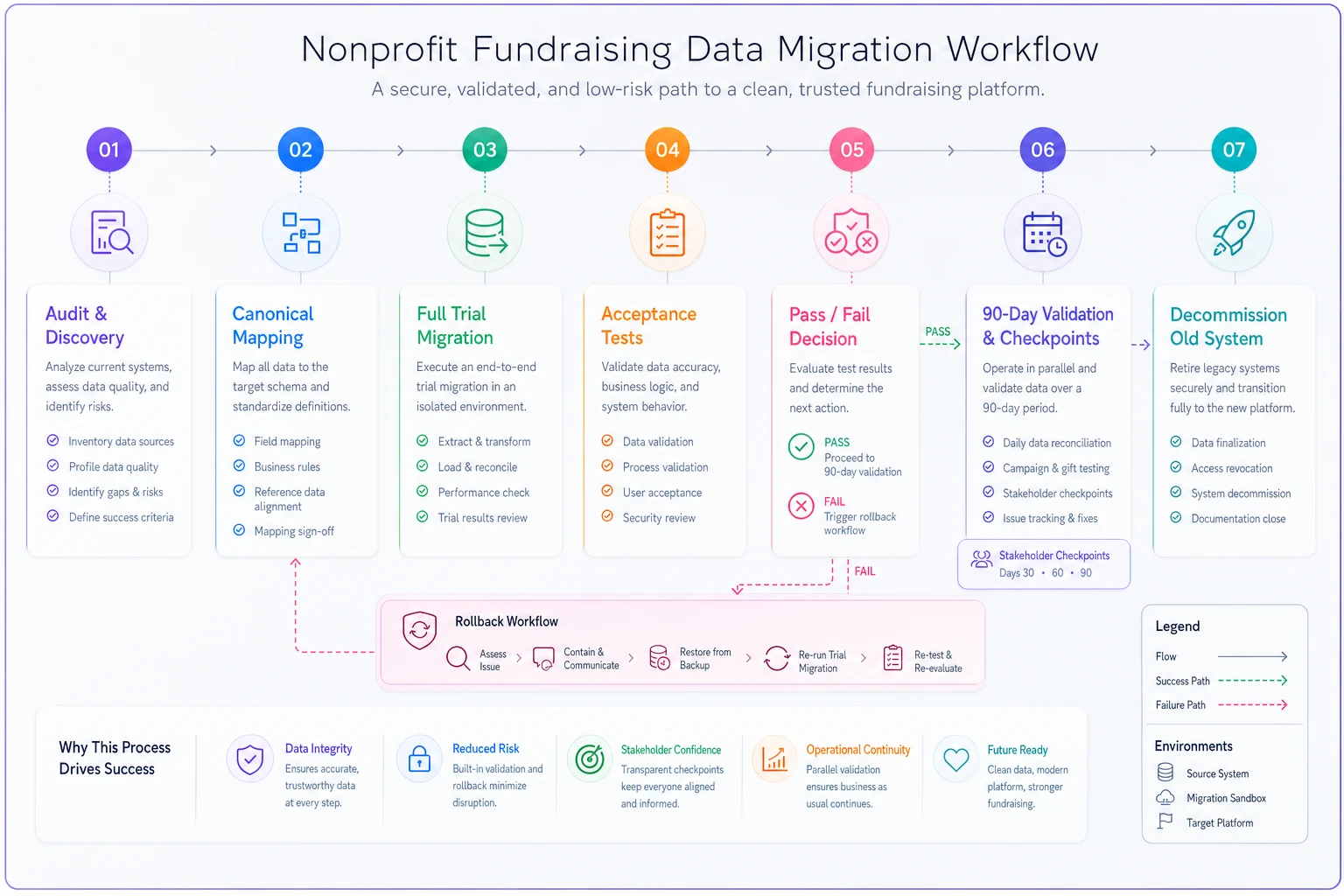
Use it as a checklist during trial migrations.
Do those five things and the migration becomes almost boring — which, when you're moving fourteen years of donor relationships and restricted funds, is exactly what you want. Boring means the history survived, the totals reconcile, and the donor who's given every year since 2011 still shows up as the loyal supporter they are, not a stranger the system just met.
Ready to elevate your fundraising efforts?
Join 2,000+ nonprofits using Givioly to save time, increase donations, and build lasting donor relationships.