

Three months ago, a food bank in Ohio discovered their major donor records had been quietly corrupted for over a year. Different staff members had been updating the same donor profiles through different systems—their CRM, their email platform, and spreadsheets—creating what were essentially three parallel universes of donor information. When they tried to pull a year-end giving report, nothing matched. Gift amounts were different, communication preferences contradicted each other, and they'd been sending duplicate appeals to some donors while missing others entirely.
When bad donor data costs more than just time
This wasn't a technology problem. It was a fundraising data governance nonprofit problem that shows up in some form at almost every small shop I've worked with. The frustrating part? They had all the right software. What they lacked was any practical system for managing who could change what data, when changes happened, and how to catch problems before they spiraled.
After helping dozens of nonprofits untangle similar messes, the pattern is almost always the same: small fundraising teams treat data governance like something only large organizations need to worry about. They figure their size protects them from real data chaos. It doesn't. Smaller teams actually face a more specific challenge—the same person often enters donations, pulls reports, updates donor records, and manages integrations. Without clear ownership, data integrity erodes gradually and then all at once.
Why most governance frameworks don't fit small teams
Most fundraising data governance frameworks are built for organizations with dedicated database administrators. They assume someone's full-time job is managing data architecture. Small nonprofits don't work that way. Your development coordinator might be processing gifts in the morning, updating donor profiles at lunch, and building campaign segments before end of day.
Simplify donor management and fundraising workflows.
Givioly helps you organize campaigns, engage donors, and maximize fundraising impact seamlessly.
- Unified donor profiles
- Real-time donation tracking
- Automated impact reporting
No credit card required
The standard advice is to create comprehensive data dictionaries, establish steering committees, and implement multi-step approval chains. I watched a four-person development team try to implement a 47-page governance policy adapted from a university template. Within two weeks, everyone had abandoned it. The policy required three levels of approval for basic updates and documentation that took longer to complete than the actual work.
What works for small teams is lightweight governance embedded into existing workflows—not a separate layer of bureaucracy, but clear rules people can actually follow. The gap becomes obvious when you think about how data actually moves through a small nonprofit. Monday, someone processes weekend online donations. Tuesday, they're importing event registrations. Wednesday, a board member sends over a spreadsheet of personal contacts to add. Thursday, the direct mail vendor needs an export. Friday, someone's updating giving levels for the annual report.
Each of those touchpoints is where governance either holds or breaks. When the same person is responsible for all of them, consistency is hard without some kind of structure to fall back on.
Building a RACI matrix without overcomplicating it
RACI matrices usually make people's eyes glaze over. In fundraising data governance nonprofit settings, though, they're genuinely useful when kept focused on actual decisions your team makes—not theoretical responsibilities.
| Data Domain | Responsible | Accountable | Consulted | Informed |
|---|---|---|---|---|
| Donor contact info updates | Gift processor | Development Director | Major gifts officer (for portfolio donors) | Full team (weekly summary) |
| Gift entry & coding | Gift processor | Finance lead | Program staff (for restricted gifts) | Development Director |
| Giving level calculations | Database coordinator | Development Director | Finance lead | Board (quarterly) |
| Deceased/inactive flags | Any team member | Development Director | Full team | Database coordinator |
| Wealth screening data | Major gifts officer | Development Director | CEO (for top prospects) | Gift processor |
| Email preference updates | Marketing coordinator | Development Director | — | Database coordinator |
| Custom field creation | Database coordinator | Development Director | Requesting staff member | Full team |
The value comes from actually using it rather than filing it away. When someone needs to update a major donor's giving capacity rating, they know exactly who to loop in. When marketing wants to add a new email preference field, there's a clear path forward instead of a hallway conversation that may or may not result in anything.
What tends to work best is treating the RACI as a living document—reviewed quarterly, not overhauled, just checked. "Is Sarah still the right person to approve deceased donor flags now that she's focused on major gifts?" Those five-minute conversations prevent the slow drift that happens when responsibilities shift informally and nobody documents anything.
A change request workflow people will actually follow
Most nonprofits handle data changes through email, Slack, or verbal requests. "Hey, can you update the Johnsons' address?" becomes something that may or may not happen, definitely won't be documented, and will be completely untraceable six months later when someone asks why the data changed.
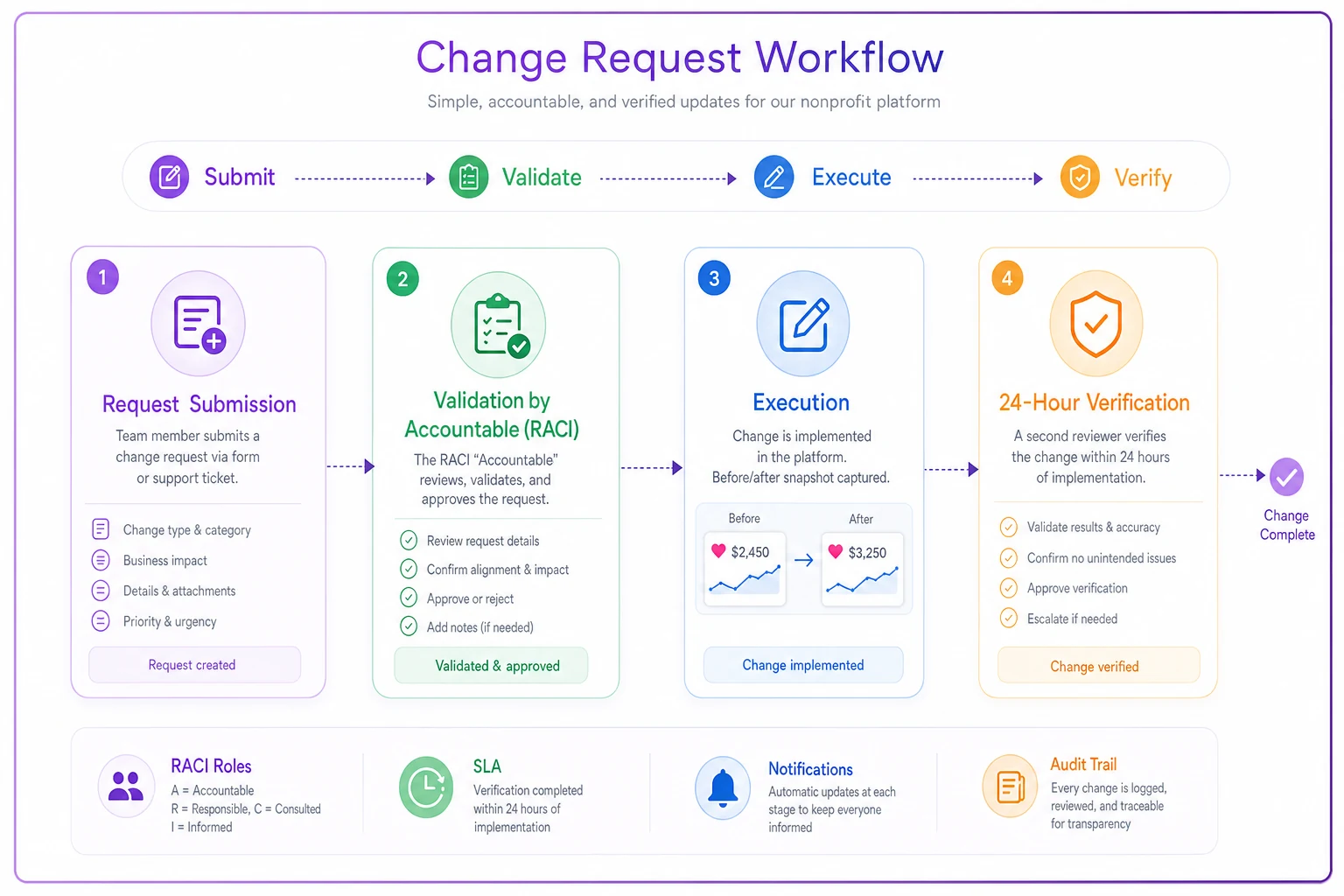
Step 1: The request A simple form or ticket. Not a complex intake process—just five fields:
-
What needs changing
-
Which records are affected
-
Why the change is needed
-
Who's requesting it
-
When it needs to be complete
Step 2: The validation Before touching any data, whoever's "Accountable" in your RACI does a quick sanity check. Are we updating the right John Smith? Will this affect any active campaigns? Takes maybe two minutes but prevents a lot of downstream problems.
Step 3: The execution The actual change happens, with one addition: documenting what the data looked like before. Screenshot, export, a quick note—doesn't matter as long as you can answer "what did we change from?" later.
Step 4: The verification Within 24 hours, someone other than the person who made the change spot-checks it. Did the update stick? Did it cascade to related records? Are reports still pulling accurately?
One nonprofit discovered their email platform wasn't syncing address updates to their CRM only because they added this verification step. They'd been updating addresses for months thinking everything was connected, while direct mail kept going to old addresses.
Here's a simple diagram of the change request workflow.
One nonprofit discovered their email platform wasn't syncing address updates to their CRM only because they added this verification step. They'd been updating addresses for months thinking everything was connected, while direct mail kept going to old addresses.
Schema versioning without a computer science degree
"Schema versioning" sounds technical, but in fundraising data governance nonprofit environments it just means tracking how your data structure changes over time. Small nonprofits constantly add custom fields, change dropdown values, and modify data relationships. Without tracking those changes, you end up with mystery fields nobody remembers creating and dropdown options that make no sense to anyone.
The practical approach is a simple changelog. Every time you add a field, change a picklist value, or modify a relationship, document:
-
Date of change
-
What changed
-
Who approved it
-
Why it was needed
-
What campaigns or reports might be affected
One development team had 47 custom fields in their CRM and couldn't explain what 15 of them were for. They were afraid to delete anything because some integration or report might depend on it. That's what happens without basic versioning—data field archaeology becomes part of the job.
Smart schema versioning also means sunset dates. When you create a custom field for the spring gala, note when it can be archived. When you add a pandemic-era donor category, flag when to review whether it's still relevant. This prevents the slow accumulation of data clutter that makes every report harder to build and every integration more fragile.
When you create a custom field for the spring gala, note when it can be archived.
This prevents the slow accumulation of data clutter that makes every report harder to build and every integration more fragile.
Release notes templates fundraising staff will actually write
Getting development staff to write release notes feels like a lost cause, but it matters for governance. The trick is making it fast and framing it as self-protection. Nobody wants to write documentation for its own sake, but most people don't want to get blamed when something breaks either.
What changed: [One sentence] Date/Time: [When it went live] Records affected: [Approximate number or scope—"all donors," "monthly donors only," etc.] Why: [Business reason, not technical] What to watch for: [Anything that might look different or behave unexpectedly] Rollback plan: [If something goes wrong, what do we do?]
The "what to watch for" field is the most useful part. When you note "gift receipts might take an extra minute to generate while the system reindexes," you prevent three panicked Slack messages. Some teams also add a one-line note about what the change actually enables—"Now we can finally segment donors by giving vehicle!"—which helps people see changes as improvements rather than disruptions.
The 30-day audit that catches problems early
Monthly audits sound overwhelming, but a focused check takes about an hour and prevents massive cleanup projects later. The key is checking specific things that tend to drift in small nonprofits' fundraising metrics systems.
-
Run duplicate detection report └── Flag name variations + same address, different names └── Review recent major gifts for potential duplicates
-
Check data completeness └── Missing emails, unacknowledged gifts, missing source tracking └── Gifts without campaign codes
-
Integration health check └── Compare record counts across systems └── Spot-check 5 recent donations end-to-end └── Review sync timestamps + error logs
-
User activity review └── Who made the most changes? └── Any unusual login patterns or off-process exports?
-
Compile one-page summary └── What's healthy / needs attention / trending wrong
One nonprofit caught through these monthly checks that their online donation form had been creating duplicate contacts for six weeks. Catching it at the monthly audit meant cleaning up around 200 duplicates instead of closer to 2,000.
The 90-day deep dive that prevents data disasters
Quarterly audits dig into systemic issues that monthly checks won't surface. This is where you look at trends, patterns, and structural problems in your donor lifecycle data.
Data quality trends Compare this quarter to last. Are duplicates increasing? Is completeness improving? Trends tell you whether your governance is actually working or just generating paperwork.
Permission and access review Who has access to what? Roles change, responsibilities shift, but database permissions often don't get updated. Former employees retaining admin access months after leaving is more common than it should be—usually not malicious, just nobody remembered to check.
Custom field utilization Run reports on your custom fields. Which are actually being used? Which have data in less than 10% of records? This is where you identify fields to retire or consolidate.
Integration deep dive Pull sample records and trace them through every system. Does a donation entered in your payment processor show up correctly in your CRM, email platform, and accounting software—same amounts, dates, coding? These spot checks reveal integration decay before it becomes critical.
Documentation accuracy Do your documented processes match what people actually do? Ask a few team members to walk through specific scenarios. If their answers don't match your documentation, you've found a governance gap.
The 90-day output should include specific recommendations with rough effort estimates. "Merge the three different 'donor type' fields (2 hours)." "Update integration mapping for recurring gifts (4 hours)." "Archive unused Spring 2019 campaign fields (30 minutes)." Concrete and actionable beats comprehensive and ignored.
Sample tickets and what the outputs looked like
Theoretical processes don't mean much without concrete examples. These are actual tickets from small nonprofit fundraising teams.
Ticket #1: Add vaccination status field for event planning Request: "We need to track donor vaccination preferences for in-person events" Submitted by: Events coordinator RACI check: Development Director (accountable), Events and Programs consulted Output: New yes/no/prefer not to say field added to contact records. Release notes flagged that historical data wouldn't exist, so early reports would show mostly blank values. The 30-day audit caught that email signup forms weren't capturing this field—quick fix, but it would have been a silent gap otherwise.
Ticket #2: Merge duplicate donor records for board member Request: "John Williams has three profiles—need to combine" Submitted by: Major gifts officer Priority: High (board meeting next week) Output: Three records merged, $47,000 in combined giving history preserved, most recent contact info retained, oldest donor ID kept for continuity. The verification step caught that one of the duplicates had a different spouse name. Turned out it was John Williams Jr., not a duplicate at all.
Ticket #3: Update deceased flags for estate planning mailing Request: "Mark 127 donors as deceased based on returned mail" Submitted by: Direct mail coordinator Verification needed: Against recent activity Output: 119 marked deceased after verification showed 8 had recent online activity—likely surviving spouses using the same email. Automated suppression from all marketing lists. The 90-day audit revealed a need for a better process around "surviving spouse" scenarios, which hadn't occurred to anyone before.
Each request becomes a chance to catch edge cases and build institutional knowledge that otherwise lives only in someone's head.
When governance stops being optional
The shift from "nice to have" to "we should have done this earlier" usually happens fast. A major donor complains about duplicate solicitations. The board asks for a report that should be simple but takes two weeks because the data's a mess. An audit reveals you can't trace how certain gifts were coded.
The food bank from the beginning of this post? After putting a lightweight governance framework in place—basic RACI, simple change tickets, monthly audits—their data cleanup time dropped from around 15 hours a month to maybe 2. Their major gift officer stopped spending Friday afternoons fixing donor records and started spending them calling donors.
There's another piece that doesn't get talked about enough: governance is what makes automation and AI-powered operational software actually work. Their email segmentation got precise because the data was clean. Their automated acknowledgment system stopped sending off-key messages because donor flags were accurate. The predictive modeling they'd been trying to implement finally produced useful outputs. Operating with corrupted or inconsistent data makes even good software unreliable—all that capability means nothing if the underlying information can't be trusted.
Making governance stick in small fundraising teams
The difference between governance that works and governance that gets abandoned isn't complexity—it's integration. Every step you add outside normal workflows is a step that won't happen when things get busy. In small nonprofits, things are always busy.
Governance sticks when it's embedded into routines that already exist. Your gift entry process already includes coding the donation—add a quick verification step. Your weekly team meeting already reviews upcoming campaigns—add a two-minute data health check. Your monthly reporting already looks at fundraising metrics—include data quality indicators alongside them.
The tools don't need to be fancy. A shared spreadsheet for your RACI beats an expensive governance platform nobody uses. A simple ticketing system—even just numbered emails in a folder—beats undocumented changes. Basic queries for audits beat complex data quality software that requires training nobody has time for.
What matters is consistency and proportion. Your governance should match your actual operational reality. A three-person development team doesn't need the same processes as a thirty-person advancement office, but they do need something. The alternative—discovering data problems only when they've become data disasters—costs far more than prevention ever would.
This isn't about perfection. Every month your data gets a little cleaner, your processes get a little tighter, and your reporting gets a little more trustworthy. That compound improvement is what separates nonprofits that scale their impact from ones that just scale their chaos.
Ready to elevate your fundraising efforts?
Join 2,000+ nonprofits using Givioly to save time, increase donations, and build lasting donor relationships.