



Most fundraising teams don't fail at picking software. They fail at the part nobody budgets time for: getting people to actually use it the way it was designed. You can spend six months on vendor selection, sign the contract, migrate the data cleanly, and still end up eighteen months later with half your gift officers keeping shadow spreadsheets and a director who trusts the export more than the dashboard.
That gap — between "we launched it" and "the team runs on it" — is where budgets quietly drain. This is a playbook for closing it, built around measurable checkpoints instead of vibes. Treat adoption as a system you monitor and correct, not an event you announce.
Why adoption stalls even when the software is fine
Adoption problems rarely trace back to the platform. They trace back to how the rollout was scoped.
Here's the pattern that shows up constantly. Leadership frames the project as a technology decision. The whole conversation becomes "which CRM," "which payment processor," "which integration." Then launch day arrives and the assumption is that people will figure it out because the tool is intuitive. Two things go wrong from there:
-
Nobody owns the definition of "correct usage." If you can't describe what a fully-adopted workflow looks like — which fields are mandatory, which stage a gift lives in, who logs what and when — you have no way to tell whether adoption is actually happening.
-
The old system never dies. People keep their comfortable spreadsheet "just for now." That parallel system becomes the source of truth for whoever maintains it, and the new platform slowly becomes the place where data goes to rot.
This usually happens because the switchover has no forcing function. A gift officer who's behind on entries faces zero consequences for staying behind, and the workaround is faster short-term. Multiply that across a team of eight and within a quarter your reports are describing a reality that doesn't exist.
There's also a coordination problem that scales badly. When two people use the system slightly differently — one logs a pledge as a commitment, another logs it as a gift — the discrepancy is invisible at low volume. At higher volume, reconciliation breaks, forecasting drifts, and leadership starts making decisions off numbers that are quietly wrong.
The three-audit backbone: 90, 180, 365
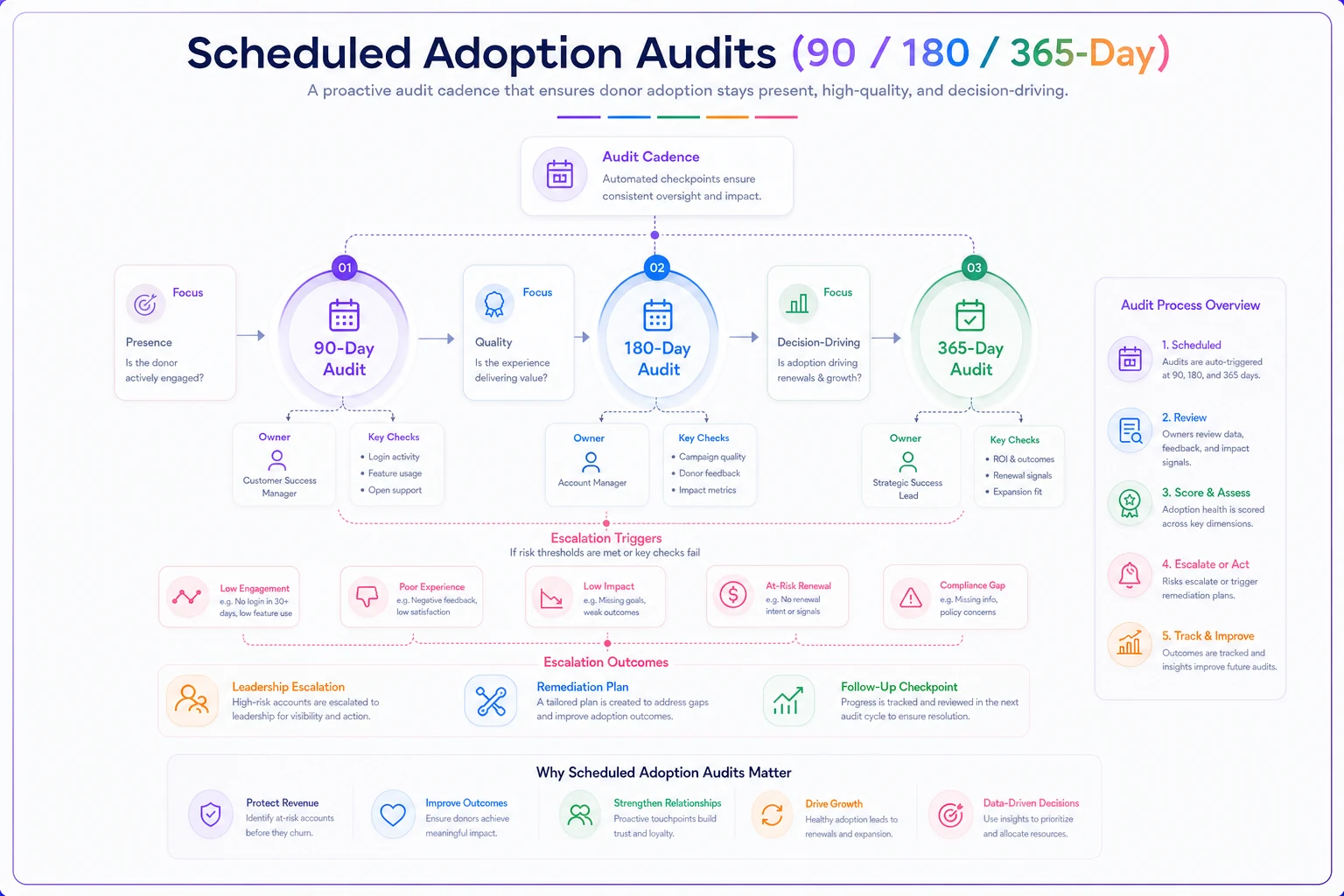
The most useful shift you can make is committing to scheduled adoption audits at fixed intervals. Not "we'll check in eventually" — actual calendar dates with owners assigned before launch. Each audit has a different job.
Simplify donor management and fundraising workflows.
Givioly helps you organize campaigns, engage donors, and maximize fundraising impact seamlessly.
- Unified donor profiles
- Real-time donation tracking
- Automated impact reporting
No credit card required
| Audit | Primary question | What you measure | Typical failure it catches |
|---|---|---|---|
| 90-day | Are people using it at all? | Login frequency, % of gifts entered in-system vs. offline, backlog of unlogged activity | Shadow spreadsheets, people avoiding the tool entirely |
| 180-day | Are they using it correctly? | Field completeness, stage consistency, duplicate rate, SLA adherence on data entry | Everyone doing it their own way, drifting definitions |
| 365-day | Is it driving decisions? | Report usage, forecast accuracy vs. actuals, do managers pull from the system or ask for exports | Dashboards nobody trusts, parallel reporting still alive |
The 90-day audit is about presence. The 180 is about quality. The 365 is about whether the system has become the actual operating layer of the team or just an expensive filing cabinet. Skipping the earlier audits and jumping straight to "is it working" a year later is how teams discover they've lost a year.
On the 90-day check specifically: keep it blunt. You're not evaluating sophistication yet. You're answering whether the behavior changed. If 30% of gifts are still landing in a spreadsheet first, that's your headline — and it's a leadership problem to solve before you worry about field hygiene.
This diagram shows the audit cadence and where each checkpoint focuses.
On the 90-day check specifically: keep it blunt. You're not evaluating sophistication yet. You're answering whether the behavior changed. If 30% of gifts are still landing in a spreadsheet first, that's your headline — and it's a leadership problem to solve before you worry about field hygiene.
Pre-launch: roles and communication before anyone logs in
Almost every durable adoption I've seen was decided in the two weeks before launch, not after. The pre-launch phase is where you set the forcing functions and remove the "I didn't know" excuse.
Define roles in writing. Not job titles — system roles. Who enters gifts. Who verifies them. Who owns duplicate cleanup. Who has admin rights and who explicitly does not. Vague ownership is the number one predictor of a stalled rollout, because "everyone's responsible" means the backlog belongs to no one.
A workable pre-launch role sheet covers:
-
Data entry owners — the people responsible for logging specific gift types, with a stated SLA (e.g. online gifts logged same-day, offline within 48 hours)
-
Verification owner — one person who spot-checks entries against source documents weekly
-
Super-users — roughly 1 per 4–6 staff, the local experts who answer questions so people don't default back to spreadsheets
-
System owner — the single accountable person for the platform overall, usually ops or database management
-
Report consumers — leadership, named explicitly, who commit to pulling from the system rather than requesting side exports
Publish the system owner by name in launch communications so there's no ambiguity about who to contact.
On the communications side, the mistake is treating launch as a single announcement. It needs to be a short sequence with a consistent message: this is the source of truth now, here's what changes for you specifically, here's who to ask. Generic "we're switching CRMs" emails don't change behavior. A message that says "starting Monday, your gift entries feed the board report directly, so anything not in the system doesn't count" changes behavior.
If you're rolling this out alongside a data migration, the sequencing matters enormously — a botched migration poisons adoption before it starts. It's worth structuring the technical side properly using pre-migration audits, canonical mapping templates and rollback criteria so the team's first experience with the new system isn't "the data's wrong."
Super-user training that actually holds
Buying a system and running one vendor demo is not training. It's a tour. The teams that get sticky adoption invest in a small number of hands-on super-users who become the internal answer for daily friction.
The approach that works better than sitting everyone through the same slideshow:
-
Pick super-users by workflow, not seniority. You want the person who does the most gift entry, not the manager who barely touches the system. Coverage should map to the actual work.
-
Train on real, messy data — not the demo sandbox. Have them process actual gifts, including the ugly cases: a split gift, a corrected duplicate, an anonymous donor, a pledge partially paid. The edge cases are where adoption dies, so that's where training should concentrate.
-
Make them build the cheat sheets. When super-users write the one-page "how we do X here" guides themselves, the guides reflect your actual conventions instead of generic vendor docs. They also learn it deeper by teaching it.
-
Run a "break it" session. Give them tricky scenarios and let them figure out the right entry path, then compare answers as a group. Disagreement here is gold — it surfaces definitional gaps before eight people start doing it eight different ways.
-
Set office hours for the first 60 days. A recurring 30-minute slot twice a week where anyone can bring a "how do I…" question. This is the pressure-release valve that keeps people from reverting to spreadsheets out of frustration.
Super-user training connects directly to onboarding new hires down the road, too. A structured ramp with competency milestones and sign-offs keeps adoption from decaying every time someone joins. The framework in role-based 30/60/90 onboarding with certification sign-offs pairs well here, because your super-users become the people who certify new staff.
Data-quality gates tied to adoption KPIs
Adoption and data quality are the same problem wearing two hats. A system with high login rates but garbage data isn't adopted — it's just being abused efficiently. The gates that actually matter measure both behavior and cleanliness at once.
Set a small number of gates, not twenty. Teams that track everything end up tracking nothing. A tight starter set:
-
Entry timeliness — % of gifts logged within SLA. Something like 90%+ by the 180-day mark is a reasonable target.
-
Field completeness — % of records with all required fields populated. Watch which fields people skip; those reveal where the workflow feels like busywork.
-
Duplicate rate — new duplicates created per month. A rising number usually means people can't find existing records, which points to a search training failure.
-
Stage consistency — do gifts and opportunities sit in the right stages, or is everything either "new" or "closed" because nobody uses the middle stages? This one quietly wrecks pipeline forecasting.
-
Offline leakage — gifts that appeared in a spreadsheet or email before hitting the system. This is your shadow-system detector, and arguably the most honest adoption metric you have.
The trick is tying each gate to a review point rather than a dashboard nobody opens. Duplicate rate spiking? That goes on the 180-day audit agenda with a name attached. The gate isn't a number on a screen — it's a trigger for a specific conversation with a specific owner.
A realistic rollout, before and after
Consider a mid-sized arts nonprofit — nine people in development, somewhere around $2.4M raised annually across events, major gifts, and a growing monthly program. They'd moved to a new CRM and, on paper, everyone was "using it."
The 90-day audit told a different story. About a quarter of offline event gifts were still being tracked in a shared spreadsheet before anyone touched the CRM. Two gift officers had logged almost nothing in pipeline stages because keeping their own notes was faster. The board report was being hand-assembled from three sources every month — a job that ate the better part of two days.
They didn't buy anything new. They ran the playbook. Named a single system owner, appointed two super-users, wrote SLAs for gift entry, and killed the event spreadsheet by making the CRM the only accepted intake path for the next event. Set four data gates and put them on the 180-day agenda.
By the 180-day audit, offline leakage had dropped to a handful of edge cases, entry-within-SLA was sitting in the low 90s, and the monthly board report had gone from a two-day scramble to a few hours because the numbers reconciled on their own. The 365-day check showed the real win: leadership had stopped asking for side exports and started pulling the dashboard directly in meetings. That's adoption — not the login count, but the moment the system becomes what people argue from instead of around.
When this level of rigor makes sense — and when it doesn't
This playbook is built for teams where multiple people share data and coordination actually matters. It pays off most when you have several gift officers, mixed gift channels (online, offline, events, monthly), and leadership that needs trustworthy reporting.
When it's overkill: a one- or two-person shop where everyone touches everything and the "system" is basically one person's habit. You still want clean data, but formal 90/180/365 audits and a super-user program are more ceremony than the situation warrants. A lighter monthly data check is plenty.
Who should hold off: teams still mid-migration or on a platform they already plan to leave. Don't build adoption discipline on top of a system you're about to abandon — you'll just have to redo it. Stabilize the platform decision first, then layer this in.
When it's genuinely worth the effort: any team that's been burned by numbers they couldn't trust. If you've ever had two people bring different totals to the same meeting, or discovered the "real" data lived in someone's spreadsheet, this is the fix.
Where lightweight automation quietly helps
None of this requires fancy tooling, but a few things get much easier when the system does the nagging for you. The most useful automations in an adoption rollout aren't flashy — they're the boring ones that reduce manual policing.
Automated flags for records missing required fields mean your verification owner isn't manually scanning entries. Duplicate detection at the point of entry stops the problem instead of cleaning it up later. Simple reminders when a gift sits unlogged past its SLA remove the awkward human follow-up. Dashboards that recalculate on their own are what let leadership drop the side-export habit for good.
The point isn't to automate people out of the workflow. It's to remove the friction that pushes them back toward spreadsheets in the first place. An AI-assisted operational platform earns its keep here by handling the repetitive checks — completeness, duplicates, timeliness — so your team's attention goes toward the judgment calls that actually need a human. When the system catches small mistakes early, adoption stops being something you enforce and starts being the path of least resistance.
The mindset that makes it stick
Adoption isn't a launch milestone you clear and forget. It's a signal that decays the moment you stop watching it. Teams that keep systems healthy treat the 90/180/365 audits as recurring maintenance — the same way you'd treat reconciliation or a data hygiene review — not as a one-time project close-out.
Get the roles named before launch, put real dates on your audits, build a couple of genuine super-users, and tie a small set of data gates to actual review conversations. Do that, and you stop wondering whether the software is working. You'll know — because the numbers everyone brings to the room will finally match.
Get the roles named before launch, put real dates on your audits, build a couple of genuine super-users, and tie a small set of data gates to actual review conversations. Do that, and you stop wondering whether the software is working. You'll know — because the numbers everyone brings to the room will finally match.
Ready to elevate your fundraising efforts?
Join 2,000+ nonprofits using Givioly to save time, increase donations, and build lasting donor relationships.