
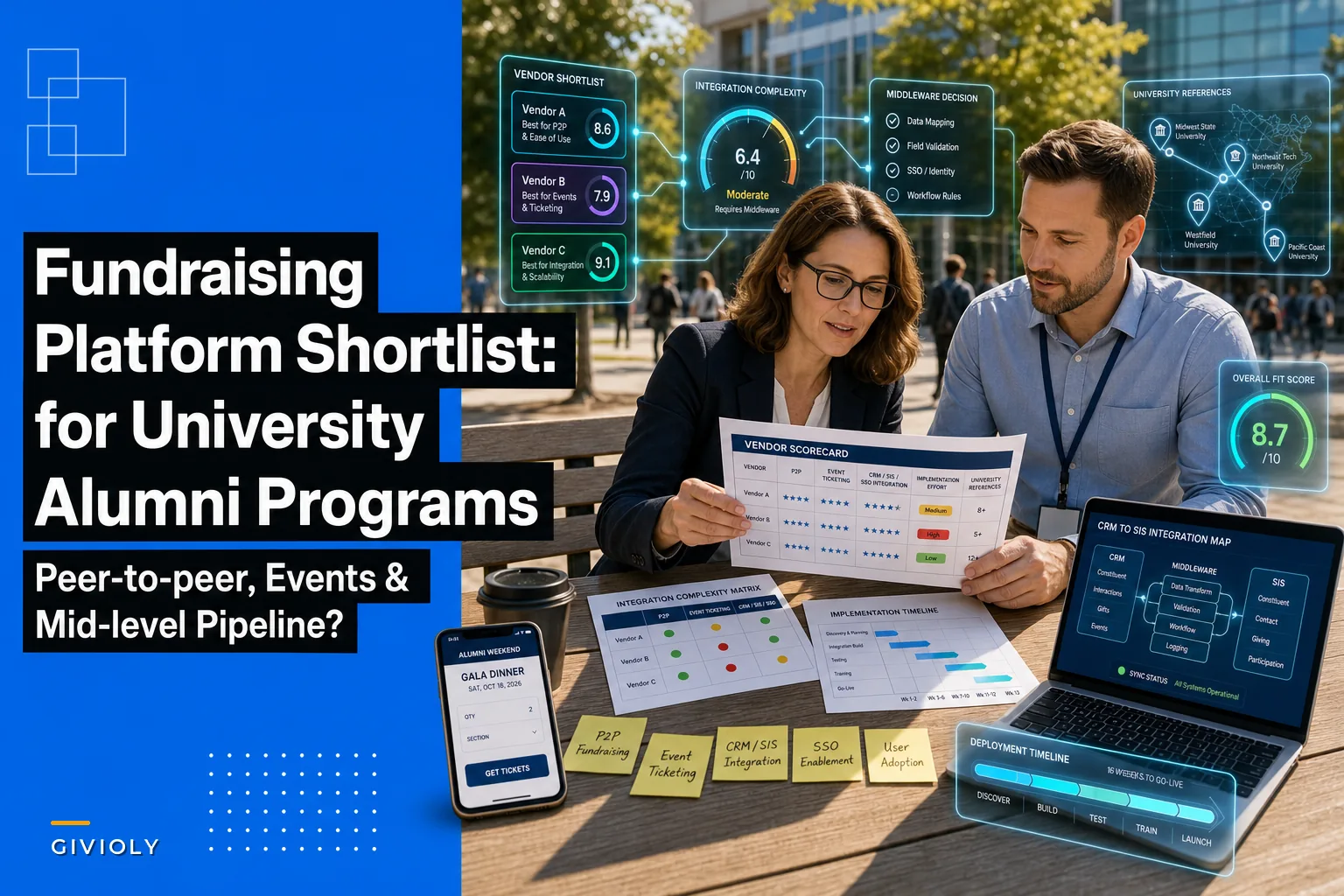

Most alumni shops don't fail at platform selection because they picked a bad vendor. They fail because they picked a vendor whose integration assumptions didn't match their Banner/Colleague setup, their Salesforce or Blackbaud stack, or their campus SSO rules. By the time that mismatch surfaces, you're six weeks into an implementation and the project plan has quietly slipped a quarter.
This brief covers six vendors (plus one honorable mention) that genuinely support the three things advancement teams keep asking for together: peer-to-peer campaigns, event ticketing/registration, and a mid-level donor upgrade pipeline. For each one, you'll get the kind of institutional reference profile that actually matters, a plain-language integration-complexity read across CRM / SIS / SSO / payments / ticketing, a realistic deployment timeline, and the type of institution it fits.
One ground rule: this is about platform selection and integration, not pipeline construction. If you're still building your upgrade logic — score thresholds, moves management triggers, segment definitions — read the companion piece on mid-level donor segmentation mistakes and a practical scoring model first. That article does the tactical work. This one assumes you already know what your pipeline should do, and you're trying to find the tool that won't fight you on it.
How to read the integration-complexity ratings
The single biggest reason timelines blow up is that teams evaluate features in the demo and discover integration reality during implementation. Each profile rates five integration surfaces on a Low / Medium / High scale:
-
CRM — How cleanly does giving, constituent, and designation data round-trip to your system of record (Salesforce NPSP, Blackbaud RE NXT, Ellucian CRM Advance, Affinaquest, etc.)? "High" means expect middleware, field mapping workshops, and a data person on every call.
-
SIS — Student Information System reconciliation. For alumni programs this mostly matters for constituent matching, class-year accuracy, and avoiding duplicate records when a recent grad appears in both systems. Banner and Colleague show up most.
-
SSO — Will it sit behind your campus identity provider (Shibboleth, Okta, Azure AD, CAS)? Volunteer and committee-facing tools especially need this.
-
Payments — Merchant account flexibility, whether you can use your existing processor, PCI scope, and how refunds/chargebacks reconcile.
-
Ticketing — Depth of event registration
tiered pricing, tables/sponsorships, capacity rules, name badges, check-in, and whether ticket revenue vs. gift revenue is cleanly separable for accounting.
A vendor can be excellent and rate "High" on complexity. High isn't bad — it's a staffing and timeline warning.
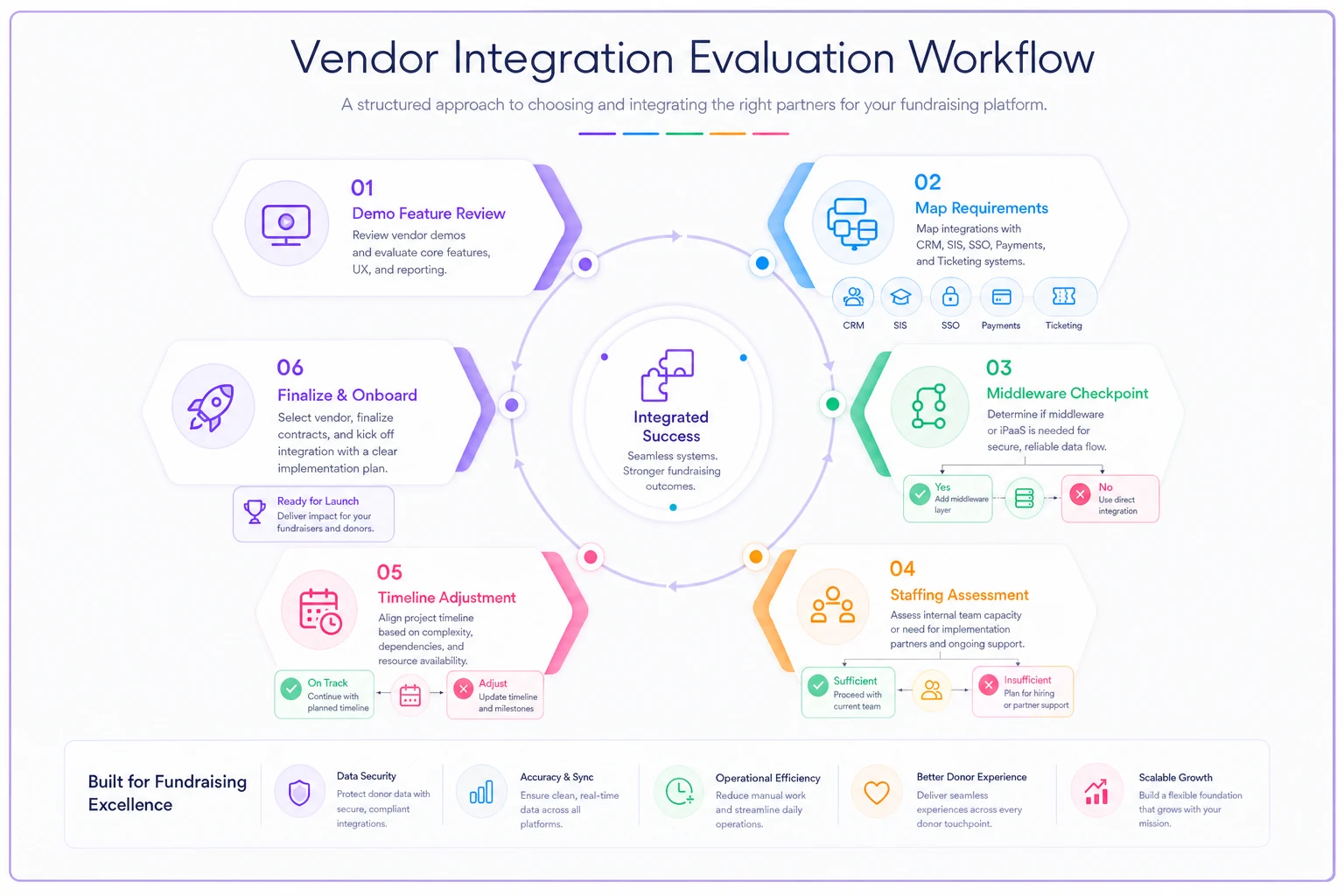
Here's a quick workflow to visualize the vendor-to-systems integration checks.
The six-vendor shortlist
Each profile follows the same structure so you can compare directly. Timelines reflect what mid-sized advancement teams (roughly 8–25 staff) tend to actually experience, not the vendor's best-case marketing number.
Simplify donor management and fundraising workflows.
Givioly helps you organize campaigns, engage donors, and maximize fundraising impact seamlessly.
- Unified donor profiles
- Real-time donation tracking
- Automated impact reporting
No credit card required
1. GiveCampus
GiveCampus is the one most alumni teams already know, largely because of its dominance in giving-day and crowdfunding work. Its peer-to-peer and volunteer advocacy tooling is genuinely mature — ambassador links, class-agent dashboards, and social-share tracking aren't bolted on.
Where it's verified: Public case references across liberal arts colleges and larger research universities running annual giving days, with documented participation lifts on reunion-class campaigns. These are easy to vet because many schools publish their giving-day landing pages on the platform.
Realistic deployment: 6–10 weeks for giving/P2P; longer if you lean hard on events.
Ideal institution: Schools whose center of gravity is annual giving, reunion classes, and volunteer-driven peer-to-peer. If events are your primary need, this isn't your lead vendor.
| Surface | Complexity | Notes |
|---|---|---|
| CRM | Medium | Solid connectors to RE NXT and Salesforce; designation mapping needs a workshop. |
| SIS | Low | Alumni-focused; limited direct SIS dependency. |
| SSO | Medium | Volunteer portal SSO is doable but not always day-one. |
| Payments | Low | Flexible, handles giving-day volume spikes well. |
| Ticketing | Medium | Events exist but are the weaker leg vs. dedicated ticketing tools. |
The events side has improved, but it's still not where most teams would anchor a gala or a reunion weekend with complex ticketing tiers.
2. Classy (GoFundMe Pro)
Classy's peer-to-peer and recurring-giving engine is among the more polished on the market, and its event registration has matured significantly in recent years. The trade-off for alumni teams: it's built for the broad nonprofit world, so campus-specific needs like class year logic and SIS matching lean on your CRM middleware rather than native features.
Where it's verified: Case references skew toward large nonprofits and some university foundations using it for signature fundraising events and P2P challenges. For higher-ed specifically, ask for a reference running it alongside a dedicated advancement CRM — that's the realistic config.
Realistic deployment: 8–14 weeks, most of it CRM integration.
Ideal institution: Foundations or advancement offices already standardized on Salesforce, with a data person who can own the sync.
| Surface | Complexity | Notes |
|---|---|---|
| CRM | High | Salesforce integration is deep (shared lineage); non-SF stacks need middleware. |
| SIS | High | No native SIS awareness; matching lives entirely in your CRM. |
| SSO | Medium | Supporter accounts, not campus identity, is the default assumption. |
| Payments | Low | Strong processor, good recurring handling. |
| Ticketing | Medium | Registration is capable; sponsorship/table logic is workable but manual. |
If you're not on Salesforce, the integration story gets heavier fast. Worth being direct about that in vendor conversations rather than assuming it'll work itself out.
3. Anthology Encompass (formerly iModules / Encompass)
This is the higher-ed-native option. Encompass was built for advancement from the start, which shows in email, event, and online giving tightly wired to the constituent record. The flip side is that it's a heavier platform — more capable, more to configure, more to maintain.
Where it's verified: Deep bench of mid-size and large university references, including engagement- and event-heavy programs. Because it's so common in advancement, you can usually find a peer institution of similar size to call directly.
Realistic deployment: 10–16 weeks; longer for full engagement-platform rollouts.
Ideal institution: Mid-to-large universities that want events, email, and online giving unified and are willing to staff the configuration work.
| Surface | Complexity | Notes |
|---|---|---|
| CRM | Medium | Native constituent model; strong if you're in its ecosystem, more work if not. |
| SIS | Medium | Better SIS awareness than consumer-grade tools. |
| SSO | Medium | Campus SSO supported, part of standard scoping. |
| Payments | Medium | Flexible but configuration-heavy. |
| Ticketing | Low | Events and registration are a core strength. |
The configuration load is real. Teams that understaff the implementation consistently end up with a capable platform they're only using at 60% because nobody had time to build the workflows properly.
4. Almabase
Almabase sits specifically in the alumni-engagement lane — directories, mentorship, events, and giving-day/P2P designed around alumni networks rather than generic donors. Teams tend to like how quickly the community-facing side goes live.
Where it's verified: Strong set of alumni-relations case references, including schools that combined an alumni directory relaunch with a giving-day push. Ask specifically for a reference that ran the giving + events combination, not just the directory.
Realistic deployment: 6–10 weeks.
Ideal institution: Alumni-relations-led teams that want engagement, events, and P2P in one place — especially where community/directory and fundraising share an owner.
| Surface | Complexity | Notes |
|---|---|---|
| CRM | Medium | Prebuilt syncs to RE and Salesforce; still needs mapping sessions. |
| SIS | Medium | Handles alumni/class-year logic reasonably. |
| SSO | Low | Community portal SSO is a well-worn path here. |
| Payments | Low | Straightforward. |
| Ticketing | Low | Event registration is a genuine strength, including reunions. |
Where Almabase can fall short is on mid-level pipeline depth — it handles engagement signals reasonably well but may not give you the scoring granularity a larger upgrade program needs without supplementing via your CRM.
5. Community Funded (CU-focused)
Community Funded leans into giving days and crowdfunding, with strong customization for brand and campaign structure. It's a fit when you want campaigns that look fully yours and you have design and marketing capacity to use that flexibility.
Where it's verified: University giving-day references, often larger public institutions with high-volume single-day events. The useful reference question: what did peak-hour transaction volume look like, and did reconciliation stay clean?
Realistic deployment: 7–11 weeks.
Ideal institution: Large public universities running flagship giving days where brand control and crowdfunding breadth matter.
| Surface | Complexity | Notes |
|---|---|---|
| CRM | Medium | Exports and integrations exist; plan for a reconciliation routine. |
| SIS | Medium | Constituent matching handled via CRM. |
| SSO | Medium | Supported for admin/volunteer roles. |
| Payments | Low | Built for high-volume giving-day spikes. |
| Ticketing | Medium | Events supported; crowdfunding/P2P is the stronger leg. |
The brand flexibility is genuinely useful for large public institutions that run giving days as a campus-wide marketing moment, not just an advancement exercise. Less compelling if that's not your context.
6. OneCause
OneCause earns its place on an events-heavy shortlist. If your calendar is anchored by galas, auctions, and ticketed reunion events, its registration, mobile bidding, and check-in tooling is purpose-built in a way the giving-first platforms aren't.
Where it's verified: References skew toward event- and gala-driven programs, including university foundations running signature benefit events. For P2P and mid-level pipeline work, verify it's being used with an advancement CRM — that's where the donor intelligence has to live.
Realistic deployment: 6–10 weeks for events; CRM reconciliation adds time.
Ideal institution: Programs where ticketed events and auctions drive meaningful revenue and need dedicated tooling.
| Surface | Complexity | Notes |
|---|---|---|
| CRM | High | Event data needs a disciplined sync back to your system of record. |
| SIS | High | No native SIS logic; matching is on you. |
| SSO | Medium | Admin SSO supported; attendee side is account-based. |
| Payments | Low | Strong for event-day transaction volume. |
| Ticketing | Low | Best-in-class for galas, auctions, tables, check-in. |
The CRM sync is the thing teams consistently underestimate. Event attendee data sitting in OneCause and not flowing reliably into your scoring environment means those donors effectively disappear from your pipeline until someone manually reconciles — which usually means they disappear.
Honorable mention: Salesforce NPSP + Fonteva/Blackthorn
Not a single product — a build-it-yourself stack. If your institution is already all-in on Salesforce, assembling events (Fonteva or Blackthorn) and P2P (Classy) on top of NPSP gives you the most control over the mid-level pipeline, because everything lives in one data model. The cost is real integration and admin work. This is for teams with a dedicated Salesforce administrator, not teams hoping to set it and forget it.
The honest comparison: who leads on what
No single platform wins all three jobs. The pattern across these vendors is fairly consistent once you get past the demos:
| Vendor | P2P strength | Event ticketing | Mid-level pipeline fit | Integration load |
|---|---|---|---|---|
| GiveCampus | Strong | Moderate | Moderate | Low–Medium |
| Classy | Strong | Moderate | Strong (on Salesforce) | High |
| Anthology Encompass | Moderate | Strong | Strong | Medium |
| Almabase | Strong | Strong | Moderate | Low–Medium |
| Community Funded | Strong | Moderate | Moderate | Medium |
| OneCause | Moderate | Strong | Moderate (needs CRM) | High |
The mid-level upgrade pipeline is where teams get surprised most often. Peer-to-peer and events are features a platform either has or doesn't. The upgrade pipeline is data behavior — it only works if gift history, engagement signals, and designation data flow reliably back to wherever your scoring lives. That's why the integration load column matters more than the feature columns for pipeline purposes.
Integration checklist (take this into every demo)
The goal is to surface the "High" items before the contract, not after.
-
[ ] System of record confirmed Is CRM write-back real-time, nightly batch, or manual export? Get the actual sync frequency, not "it integrates."
-
[ ] Designation and fund mapping Can campaign/event funds map to your GL and designation codes without manual re-keying?
-
[ ] Duplicate prevention How does the platform match a constituent who already exists in your CRM? What's the match logic, and who resolves conflicts?
-
[ ] SIS interaction (if any) Will recent-grad records collide with existing alumni records? Confirm the matching rule.
-
[ ] SSO scope Which user types (admin, volunteer, attendee, donor) sit behind campus SSO vs. platform accounts?
-
[ ] Payment reconciliation Can you separate ticket revenue, sponsorship revenue, and charitable gift revenue cleanly for finance and tax receipting?
-
[ ] Refund/chargeback flow Where do reversals land in your CRM, and do they adjust donor giving totals correctly?
-
[ ] Data export on exit Full export format and ownership terms, in writing, before you sign.
-
[ ] Sandbox access Can your data person test the sync with real (anonymized) records during evaluation?
The last two matter more than teams expect. A clean exit clause and a working sandbox tell you more about a vendor's integration maturity than any feature list.
A short decision framework
Instead of scoring every vendor on 40 criteria, start from your revenue center of gravity. The platform should match where your money and your effort actually concentrate.
-
Name your dominant revenue engine. Is it annual giving and giving days, ticketed events, or alumni-network engagement? Be honest about the next 18 months, not aspirational.
-
Pick the leg you refuse to compromise on. If events drive real dollars, lead with an events-native tool and integrate giving around it. If P2P and giving days are the heartbeat, lead there.
-
Rate your integration tolerance. Do you have a data/CRM owner who can run a sync? If not, a "High" integration vendor is a hidden staffing cost — treat it as part of the price.
-
Verify one peer reference running your exact combination. Not a reference that uses the platform — a reference running the same two or three jobs you need, at roughly your size.
-
Confirm the mid-level data path. Check that gift and engagement data lands in your scoring environment reliably. If it doesn't, your upgrade pipeline will run on stale data no matter how good the platform's front end looks.
When a single all-in-one actually makes sense
Smaller shops — under about 10 staff, running one or two signature events a year, no dedicated Salesforce admin — usually benefit from consolidating on a higher-ed-native platform like Encompass or an engagement-led tool like Almabase. Fewer syncs, fewer failure points, fewer reconciliation headaches at the end of the month.
When a best-of-breed stack makes sense
If events and giving each drive serious revenue and you have real technical capacity, deliberately pairing specialists (say, OneCause for galas plus Classy or GiveCampus for P2P, both feeding one CRM) will outperform a jack-of-all-trades. Just budget for the integration work honestly — it's not a one-time setup cost.
Who should not do best-of-breed
Teams without a data owner. Full stop. Every additional platform is another sync to monitor and another place reconciliation can quietly break. If nobody on your team is thinking about data integrity regularly, keep your footprint small.
A realistic scenario
A mid-size private university — roughly 45,000 living alumni, an advancement team of about a dozen people, running on Blackbaud RE NXT — went into a selection process wanting one platform for everything. Their real pattern told a different story: a flagship spring giving day, a fall gala that cleared a meaningful share of annual event revenue, and a stalled mid-level pipeline because event and giving-day donors never got scored consistently.
The all-in-one demos looked fine until the integration conversations started. The events-native options couldn't cleanly separate ticket revenue from gifts for their finance team without manual work. The giving-first options treated the gala as an afterthought.
What they landed on was a giving/P2P-led platform for the giving day, their existing RE NXT as the system of record, and a disciplined nightly reconciliation routine so event and giving-day constituents actually flowed into scoring. Nothing exotic. The change that actually moved things wasn't the platform — it was finally getting event and giving-day donors into the same scored pool as everyone else. Within two reunion cycles, their mid-level segment stopped leaking the "gave once at the gala and vanished" donors, because those people were now visible in the pipeline instead of trapped in an events silo.
The lesson wasn't "buy the best tool." It was "buy the tool whose integration reality matches your data discipline."
Bottom line for your shortlist
Feature demos will make every vendor on this list look capable, because they mostly are. The differences that decide your next three years are integration complexity, whether a true peer reference runs your exact combination, and whether donor data actually reaches your scoring environment intact.
Lead with your dominant revenue engine, protect the leg you can't compromise on, and treat every "High" rating as a staffing line item rather than a dealbreaker. Then, before you sign anything, make sure your mid-level pipeline logic is solid on its own terms — because no platform will score donors for you. Pin down that scoring model using the companion guide on mid-level donor segmentation mistakes and a practical scoring model, and let the platform serve the pipeline, not the other way around.
Ready to elevate your fundraising efforts?
Join 2,000+ nonprofits using Givioly to save time, increase donations, and build lasting donor relationships.