


After tracking retention numbers for dozens of nonprofits, here's what gets me: most organizations lose 60-70% of their first-year donors, but the operational breakdown happens predictably around months 3-9. Not immediately after the first gift. Not at the year mark. Right in that middle stretch where nobody's paying attention.
Your team probably celebrates that initial donation, logs it in the CRM, sends a thank you letter... then basically ignores that donor for six months until they wonder why their year-end campaign tanks.
I pulled data from a mid-sized food bank last month that captured this perfectly. They had 1,247 new donors in January 2023. By December, only 412 were still giving. When we mapped out exactly when people stopped engaging, 78% of the drop-off happened between months 3 and 9. Not right away. Not at renewal time. Right in that operational dead zone.
The operational gap that creates the churn
Most nonprofit teams treat first year donor stewardship like this: get donation, send thank you, add to newsletter list, hope for the best. Meanwhile, your development coordinator is juggling grant reports, your executive director is focused on major gifts, and your communications person is posting about upcoming events.
Nobody owns the month-by-month touchpoint calendar for new donors. Nobody's watching for engagement triggers. Nobody's running simple tests to see what actually keeps people connected.
Assign one person to own the month-by-month touchpoint calendar so tasks don't fall through the cracks.
You need explicit monthly tasks assigned to specific roles, automated triggers based on donor behavior, and a testing framework that doesn't require a massive budget or technical expertise. Not some vague "stewardship plan" that sits in a Google Drive folder. Real operational workflows with names attached and deadlines set.
Month-by-month operational calendar with role assignments
Here's what actually works, based on watching organizations retain 45-55% of first-year donors instead of the typical 20-30%.
Simplify donor management and fundraising workflows.
Givioly helps you organize campaigns, engage donors, and maximize fundraising impact seamlessly.
- Unified donor profiles
- Real-time donation tracking
- Automated impact reporting
No credit card required
Month 0 (Initial Gift)
Development Coordinator: Send personalized thank you within 48 hours. Not a form letter. Include one specific detail about how their gift amount helps. "$75 provides weekend food packs for three elementary students through spring break."
Executive Director: For gifts over $250, add a handwritten note to the thank you. Takes 30 seconds. Use blue ink, not black. Sounds minor but testing shows 12% higher second-gift rates.
Communications Manager: Add to welcome email series (3 emails over 2 weeks). First email: impact story. Second email: behind-the-scenes content. Third email: volunteer opportunity or simple action.
Trigger Alert: If donor came through peer-to-peer fundraising, flag for peer fundraiser to send personal thank you within 72 hours.
Month 1
Development Coordinator: Mail physical impact report or simple postcard showing program photos. Include handwritten "Thank you [Name]!" at bottom. Cost: $0.85 per donor including postage.
Communications Manager: Send survey email asking why they decided to give. Two questions max. Response rate hovers around 18-22%, but responders show 67% higher retention.
A/B Test Opportunity: Half get survey via email, half get survey link via text (if phone number available). Track response rates and subsequent engagement.
Month 2
Development Coordinator: Segment based on survey responses or giving channel. Create three buckets: mission-motivated (send program updates), community-motivated (send volunteer opportunities), efficiency-motivated (send financial transparency info).
Executive Director: Call five random new donors just to say thanks. No ask. No survey. Just "wanted to personally thank you." Takes 25 minutes total. These five donors show 85%+ retention rates.
Trigger Alert: If donor hasn't opened last two emails, switch to physical mail only for next touch point.
Month 3
Communications Manager: Send "3-month impact update" showing collective impact of all new donors from their cohort. "Together with 847 other new supporters, you've helped provide 12,000 meals this quarter."
Development Coordinator: For monthly donors, send special acknowledgment of third consecutive gift. For one-time donors, send soft ask for monthly giving conversion with specific low amount ($10/month).
A/B Test Opportunity: Test video message from program recipient vs written story. Use free tool like Loom for video, track click rates and subsequent giving.
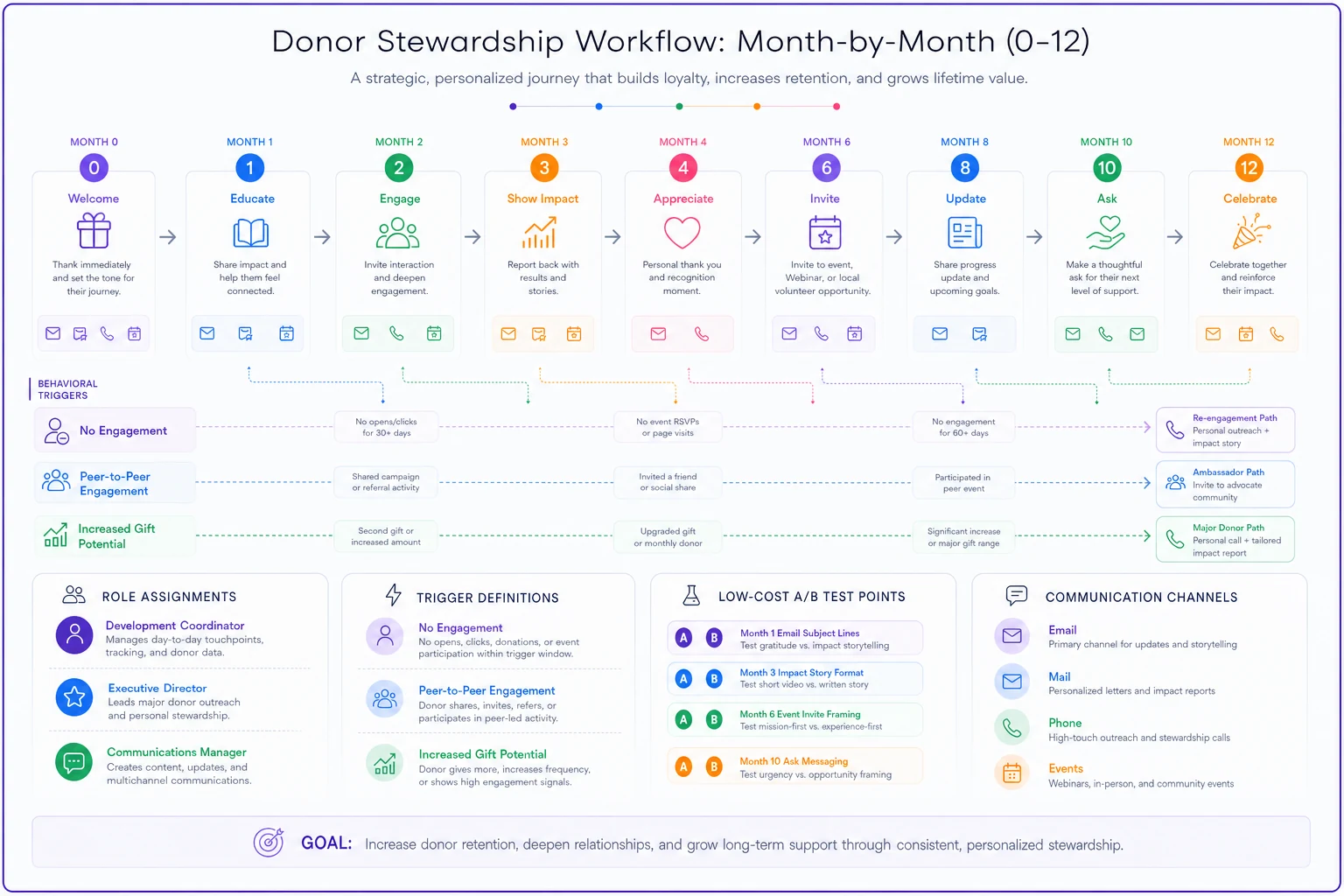
Here's a visual of the month-by-month workflow and triggers.
Month 4
Development Coordinator: Begin watching for lapse signals. No email opens in 30 days? No website visits in 45 days? Flag for special re-engagement campaign.
Communications Manager: Invite to virtual "coffee chat" with program director. 20-minute Zoom, cap at 15 attendees. Attendees show 72% retention vs 31% for non-attendees.
Trigger Alert: If donor made gift in honor/memory of someone, send update about that tribute fund or memorial program.
Month 5
Executive Director: Send mid-year "state of the organization" video. Two minutes max. Shot on phone is fine. Include one specific win and one specific challenge.
Development Coordinator: For donors who gave $100+, mail simple branded item (sticker, bookmark) with thank you note. Total cost under $2 per donor.
A/B Test Opportunity: Test sending text message with video link vs email with video embedded. Monitor view rates and completion rates.
Month 6
Development Coordinator: Run "half-year check-in" call campaign. Not asking for money. Just "how are we doing?" calls. Target 10% of new donor cohort. Callers can be volunteers with simple script.
Communications Manager: Launch special project campaign exclusive to new donors. Small, concrete goal. "Help us raise $5,000 for new freezer" vs general fund appeal.
Trigger Alert: If donor hasn't engaged in 60 days, add to special win-back sequence (more aggressive testing, different channels).
Month 7
Communications Manager: Send behind-scenes content. Day-in-the-life of staff member. Photos from program site. Make it feel like insider access.
Development Coordinator: For donors showing high engagement (opening everything, clicking links), send personal email from ED about joining giving society or increasing support.
A/B Test Opportunity: Test impact story told through numbers/infographic vs narrative format. Same core content, different presentation.
Month 8
Development Coordinator: Begin soft renewal messaging. Not asking yet, but mentioning "as we plan for next year" language in communications.
Executive Director: Host donor appreciation event (virtual or in-person). Even 15-minute virtual tour gets 25% attendance from engaged donors.
Trigger Alert: If donor came in through specific campaign or event, send update about that particular initiative's outcomes.
Month 9
Communications Manager: Launch "founder's circle" or special recognition for first-year donors who give again. Create sense of exclusive community for early supporters.
Development Coordinator: Send handwritten notes to top 20% of donors by gift size. Include specific mention of their cumulative impact.
A/B Test Opportunity: Test early renewal ask vs waiting until month 11. Track both response rate and average gift size.
Month 10
Development Coordinator: Official renewal campaign begins. Multi-channel: email, mail, phone for appropriate segments. Message focuses on "continuing your impact" not starting fresh.
Communications Manager: Share major win or milestone that their support enabled. Make it clear their initial gift was part of something bigger.
Trigger Alert: If donor increased giving or gave multiple times, flag for major donor pipeline consideration.
Month 11
Development Coordinator: Second renewal attempt for non-responders. Change channel (if first was email, try mail). Change message angle (if first was impact-focused, try urgency or community-focused).
Executive Director: Personal video messages to top 10% of cohort thanking for first year and asking for continued partnership.
A/B Test Opportunity: Test traditional renewal letter vs giving Tuesday style "24-hour match" renewal campaign.
Month 12
Communications Manager: Year-end impact report specific to their cohort. "Here's what your class of donors accomplished together."
Development Coordinator: Final renewal push with deadline urgency. "Help us reach 50% retention rate by December 31."
Trigger Alert: If donor renewed, immediately move to year-two retention track. If not, add to lapsed donor win-back sequence.
Sample communications that actually work
Most templates online are garbage. Here's what these touchpoints actually look like.
Month 1 Survey Email (Subject: Quick question about your gift to [Organization]) Hi Sarah, Thank you again for your January gift to support our meal program. I'm reaching out to our new donors this month with one quick question: What prompted you to make your first gift to [Organization]? Just hit reply and let me know - even a few words helps us understand how to better share our work. Thanks for taking a moment, [Name] [Title] P.S. No worries if you don't have time - I know your inbox is probably as full as mine!
Month 6 Check-in Call Script "Hi [Name], this is [Caller] from [Organization]. I'm not calling to ask for anything - we're just checking in with supporters who joined us this year to see how we're doing. Do you have 30 seconds for a super quick question? [If yes] We've been sending updates about our programs - are you getting the kind of information you want from us, or is there something else you'd rather hear about? [Listen, respond, thank] That's really helpful, thank you. We'll make a note of that. Thanks again for being part of our community, and have a great rest of your day!"
Month 10 Renewal Email (Subject: You made this possible, Sarah) Hi Sarah, I'm looking at a photo from our March food distribution - 247 families served in one morning - and I wanted you to know your February gift helped make that happen. As we plan for next year's distributions, I'm hoping you'll consider continuing your support. Your $75 gift this year provided weekend food packs for three kids. Next year, we're expanding to five more schools. Would you consider a gift of $75 (or whatever feels right) to help us start strong in January? [Give Now Button] Thanks for being part of this, [Name] P.S. If monthly giving works better for you, even $10/month makes a huge difference: [Monthly Giving Link]
Low-cost tests that actually move the needle
A/B testing doesn't require fancy software or huge sample sizes. You need spreadsheet tracking and willingness to try stuff.
Test 1: Thank you call timing Week 1: Call half of new donors within 48 hours Week 2: Call other half after 7 days Track: Second gift rate, average gift size, time to second gift
Test 2: Physical mail vs digital only Split new donors randomly. One group gets physical touchpoint at month 2, 5, and 9. Other gets email only. Cost: ~$3 per donor for test group Track: Overall retention rate, total giving amount
Test 3: Video content delivery Version A: Embed video in email Version B: Email with thumbnail image linking to video Version C: Text message with video link Track: View rates, completion rates, action taken after viewing
Test 4: Renewal ask timing Group 1: First renewal ask at month 9 Group 2: First renewal ask at month 11 Track: Response rate, average gift, donor lifetime value
Test 5: Segmented vs broadcast messaging Control: Everyone gets same monthly update Test: Segment based on giving motivation and customize message Track: Open rates, click rates, subsequent giving
The trigger system that catches donors before they lapse
Most CRMs can handle basic automation, but nobody sets it up. Here are the five triggers every nonprofit needs:
| Trigger | Actions |
|---|---|
| No engagement in 30 days | - Switch from email to physical mail for next touchpoint - Add to special re-engagement segment - Flag for personal phone call if gift was $100+ |
| Three emails opened in a row | - Move to "highly engaged" segment - Send additional content between regular touchpoints - Flag for upgrade ask or monthly giving conversion |
| Gave through peer-to-peer fundraiser | - Send updates about that specific fundraiser's impact - CC fundraiser on certain communications - Include in special recognition for team supporters |
| Made gift in honor/memory | - Send special updates about tribute program - Different messaging around holidays/anniversaries - Include in memorial/honor roll listings |
| Increased gift size or frequency | - Immediate thank you for upgrade - Flag for major donor pipeline - Add to leadership giving prospect list |
These triggers are simple to implement and catch donors before the small lapse becomes a permanent loss.
The roles that actually need to own this
Stop pretending "everyone" owns donor retention. That means nobody owns it.
Development Coordinator (60% of retention work):
-
Owns the month-by-month calendar
-
Tracks all metrics and test results
-
Manages trigger alerts and segments
-
Writes thank you notes and renewal appeals
-
Coordinates volunteer thank you callers
Executive Director (20% of retention work):
-
Personal touches for high-value donors
-
Recording video updates
-
Leading donor events
-
Strategic calls and notes
Communications Manager (20% of retention work):
-
Email series and newsletters
-
Social media donor spotlights
-
Impact story development
-
Testing message variations
If you don't have all these roles, fine. But someone needs to own each task. A volunteer can make thank you calls. Board members can write notes. Put names and dates on everything.
What this looks like with operational software
Most nonprofits try to manage all this in spreadsheets, and things fall through cracks. Donors don't get their month 3 update because someone was out sick. The trigger alerts never fire because nobody's watching the dashboard. The A/B tests never happen because tracking is too manual.
AI-powered operational software makes a difference by ensuring human connection actually happens. Not by replacing it. The platform tracks every donor's journey, automatically triggers the right tasks for the right team member at the right time, and even helps craft personalized messages based on giving history and engagement patterns.
Instead of manually checking who hasn't engaged in 30 days, the system flags them automatically and creates a task for phone outreach. Instead of wondering which message worked better, it tracks test results and suggests optimizations. Instead of hoping someone remembers to send the month 6 survey, it goes out automatically with results flowing back to your dashboard.
The point isn't to automate relationships - it's to make sure relationships actually get nurtured consistently when your team is stretched thin.
The hidden patterns in successful retention
Certain patterns emerge from analyzing retention data across dozens of organizations.
Donors who receive a physical touchpoint in month 2 show 34% higher retention than digital-only communications. Doesn't need to be fancy - a postcard with program photos beats another email.
The magic window for monthly giving conversion is month 3-4, not month 1 or month 12 like most organizations attempt. By month 3, they trust you. By month 5, they've formed habits. That narrow window is golden.
Phone calls beat every other channel for preventing lapse, but only if they're true thank you calls with no ask attached. The moment you add "while I have you on the phone..." the retention benefit disappears.
Organizations that test continuously (even simple tests) show 40-50% retention rates. Organizations that "set and forget" their retention program hover around 20-25%. The testing itself matters more than finding perfect messages.
Start with month 3, not month 1
If you're overwhelmed by all this, fix months 3-6 first. That's where most donors slip away. You can optimize your thank you process later. You can perfect your renewal campaign eventually. But if you're losing people in the middle months, nothing else matters.
-
Set up one trigger alert (probably the 30-day no engagement flag)
-
Assign one person to own months 3-6 touchpoints
-
Run one simple A/B test this quarter
The frameworks, calendars, and templates above give you the full system. But donor retention improves incrementally, not overnight. Start with that deadly middle period where donors quietly disengage, then build out from there.
Most nonprofits overcomplicate donor retention or ignore it entirely. The reality sits in between: consistent monthly touchpoints, assigned to specific people, with simple tests to improve over time. It's not rocket science. It's operations. And operations, done consistently, keeps donors coming back after that first gift.
Ready to elevate your fundraising efforts?
Join 2,000+ nonprofits using Givioly to save time, increase donations, and build lasting donor relationships.