


The worst time to discover your donor data is a mess is three days before a board meeting, when your development director asks why the CRM says you raised $412k but the finance report says $389k. Nobody can explain the gap. Someone spends the weekend reconciling by hand. The meeting gets pushed. And the underlying problem — the thing that caused the $23k discrepancy — never actually gets fixed, so it comes back next quarter.
Donor data hygiene isn't a one-time cleanup project. It's a maintenance rhythm. The organizations that report cleanly aren't the ones with fancier databases; they're the ones running small, boring checks every month so errors get caught while they're still cheap to fix. This post is about building that rhythm — the specific checks, who runs them, and how to keep it going when your team is three people wearing nine hats.
The Pitfalls That Actually Cause Reporting Pain
Most "dirty data" conversations stay vague. It's worth being specific about the handful of problems that cause the vast majority of reporting headaches, because if you only fix these, you fix most of your pain.
Duplicate constituent records. A donor gives online as "Bob Miller," then mails a check as "Robert Miller Jr." at a slightly different address. Now you have two records. Your donor count is inflated, your retention rate is wrong, and Bob gets two appeal letters that make your org look disorganized.
Split gift attribution. A $5,000 gift comes in through a corporate matching portal but gets coded as an individual gift. Or an event ticket purchase gets recorded entirely as a donation instead of splitting out the fair-market-value portion. These don't feel urgent until your finance team pulls their numbers and they don't match yours.
Soft credit chaos. Grandma writes the check but wants her family foundation soft-credited. Or a board member "brought in" a gift and got a soft credit that later gets double-counted in a campaign total. Soft credits are where campaign reports quietly inflate.
Stale and missing fields. Blank giving-vehicle fields, missing solicitation codes, addresses that bounced two years ago. Individually harmless. Collectively, they make segmentation unreliable.
Date and fiscal-period misalignment. Gift date vs. deposit date vs. posted date. When these drift, your monthly and fiscal-year totals stop matching accounting, and you can't tell which system is right.
None of these are dramatic. There's no single catastrophic data event — just accumulation. A little drift every week, unnoticed, until the totals diverge enough that someone finally asks about it. Usually in a room where you'd rather not be improvising an answer.
Why It Happens (and It's Rarely Carelessness)
Dirty donor data almost never comes from a lazy staffer. It comes from structural gaps:
Simplify donor management and fundraising workflows.
Givioly helps you organize campaigns, engage donors, and maximize fundraising impact seamlessly.
- Unified donor profiles
- Real-time donation tracking
- Automated impact reporting
No credit card required
-
Multiple entry points, no shared standard. Online gifts, mailed checks, event registrations, and grant records each enter through a different door, often typed by different people who each have their own naming habits.
-
Nobody owns the "in-between" data. Everyone owns their own gifts, but nobody owns the reconciliation between systems.
-
The CRM allows too much. Free-text fields where a dropdown should be. No required solicitation code. No duplicate warning at entry.
-
Turnover. The person who "just knew" how recurring gifts get coded leaves, and the tribal knowledge leaves with them.
A typical scenario: a two-person development shop where one person enters online gifts and the other enters checks. Neither writes anything down about how they code things. For eighteen months it's fine because they're both consistent with themselves. Then one goes on leave, a temp fills in, and within a quarter there are 40 duplicate records and a batch of gifts with no campaign code. Nobody did anything wrong. The system just never had guardrails.
The Core Idea: Catch Errors on a Schedule, Not on Discovery
The shift that fixes this is small but important. Stop treating data cleanup as an occasional project you dread. Start treating it as a recurring set of quick checks — most under 15 minutes — that run on a calendar whether or not anything seems wrong.
Errors are cheapest to fix close to when they happen. A duplicate caught this month takes 90 seconds to merge. The same duplicate caught in an annual audit has by then received three mailings, split a donor's giving history in two, and thrown off last year's retention number you already reported. Frequency isn't about being obsessive. It's about keeping fixes cheap.
The Monthly Checks (Short, Repeatable, Tool-Agnostic)
These work whether you're on a full CRM, a mix of tools, or an uncomfortable amount of spreadsheet. Each one is a small query or filtered view — not a project.
-
1. Duplicate scan. Sort or query for matching last name + partial email, or last name + zip. Review flagged pairs and merge or dismiss. Most months this is a short list — five to fifteen candidates.
-
2. Orphan gift check. Filter for gifts with no campaign/appeal code, no fund assignment, or no solicitation source. These are the gifts that vanish from segmented reporting. Assign codes before month-end close.
-
3. Gift-to-deposit tie-out. Pull the month's gift total from the CRM and compare it to what actually hit the bank or finance ledger. If they don't match, the difference is your worklist. This single check prevents most "our numbers don't match finance" surprises.
-
4. Soft credit sanity check. Query all soft credits created this month. Confirm each has a matching hard credit and that no campaign total is counting both. This is the one people skip and later regret.
-
5. New-donor field completeness. For every constituent created this month, confirm the required fields are populated: address, email or phone, giving vehicle, and source. Blank fields entered this month are easy to backfill; blank fields from two years ago are archaeology.
-
6. Bounce and NCOA cleanup. Flag hard email bounces and returned mail from the month and update or suppress those records so you're not paying to mail undeliverable addresses next cycle.
Here's a quick SQL example for the orphan-gift check, since it's the one people most often want but rarely write down:
``sql
SELECT giftid, constituentid, amount, giftdate
FROM gifts
WHERE giftdate >= '2025-01-01'
AND giftdate < '2025-02-01'
AND (campaigncode IS NULL OR campaigncode = ''
OR fundid IS NULL);
``
If you live in spreadsheets, the equivalent is a filtered view where campaign or fund is blank, saved as a named filter you rerun each month. The logic is identical; only the tool changes.
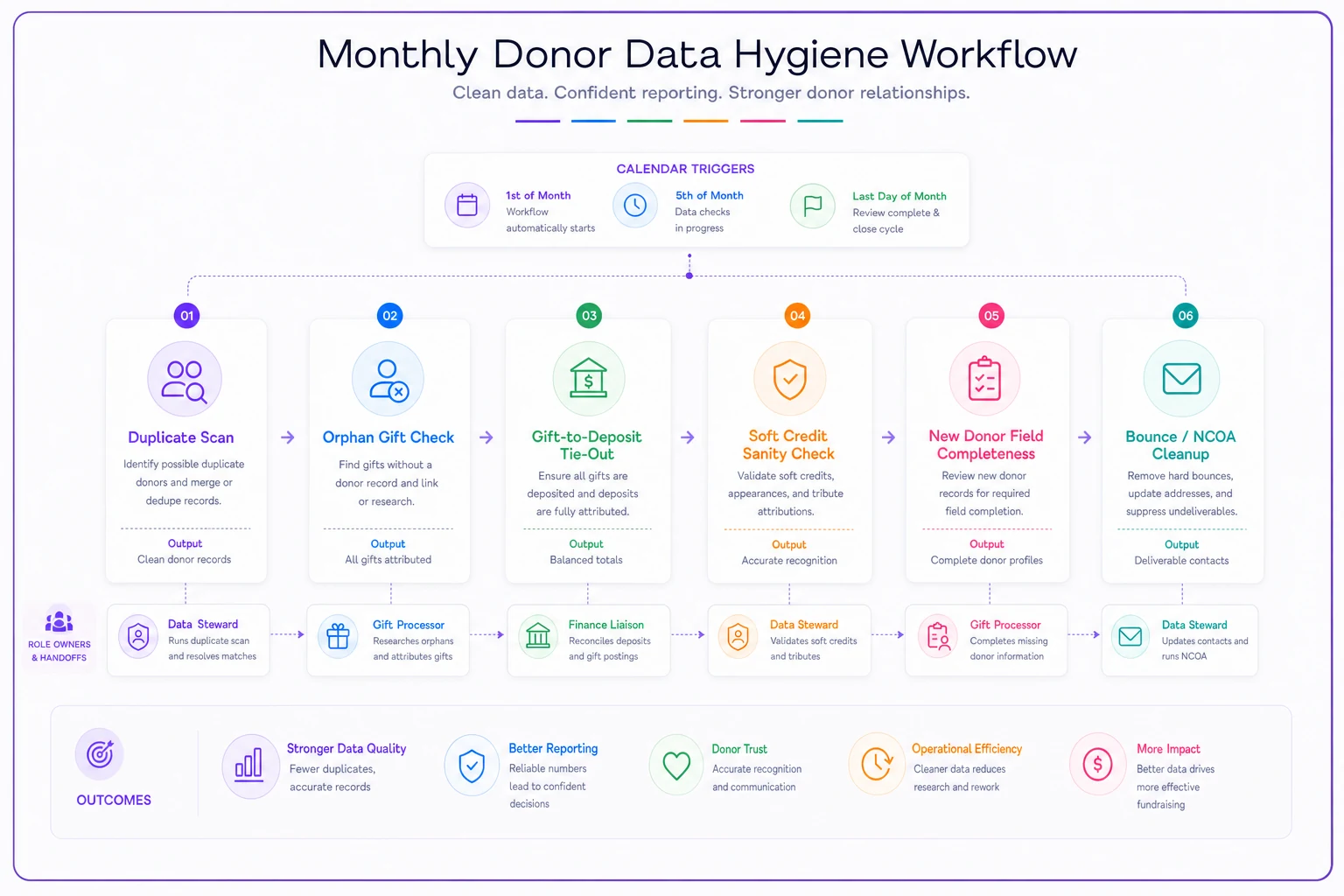
A simple visual of the monthly checks and who runs each one.
The Quarterly Checks (Deeper, Less Frequent)
Some checks aren't worth doing monthly but need to happen before quarter-end and before any report leaves the building.
-
Retention and lapsed-donor recalculation. Recompute active vs. lapsed based on your defined giving window. Confirm the definition hasn't silently drifted between reports.
-
Fiscal-period reconciliation. Full tie-out of CRM gift totals to the accounting ledger by fund, not just in aggregate. Aggregate can match while individual funds are off in opposite directions.
-
Coding audit sample. Pull a random sample of 25–40 gifts and manually verify every code: campaign, fund, gift type, soft credits. If more than a couple are wrong, you have a systemic entry problem, not a one-off.
-
Field-value standardization. Check that dropdown-style fields haven't accumulated near-duplicate values ("Facebook" vs. "FB" vs. "Social").
Some checks aren't worth doing monthly but need to happen before quarter-end and before any report leaves the building.
Who Does What: A Small-Team Role Assignment That Actually Holds
The reason data hygiene collapses in small shops isn't lack of will — it's that "everyone owns it" means no one does. You need named owners even if the same person wears two of these hats.
| Role | Owns | Cadence |
|---|---|---|
| Data steward | Duplicate scan, field completeness, bounce cleanup | Monthly |
| Gift processor | Coding accuracy at entry, orphan-gift fixes | At entry + monthly |
| Finance liaison | Gift-to-deposit tie-out, fiscal-period reconciliation | Monthly + quarterly |
| Reporting owner | Retention recalc, coding audit sample, sign-off before reports go out | Quarterly |
In a three-person team, one person might be both data steward and gift processor, and the ED covers reporting sign-off. That's fine. What matters is that each check has exactly one name attached, so when the duplicate scan doesn't happen, it's obvious whose task slipped — rather than a diffuse "we should really get to that."
Assign the finance liaison explicitly, even if it's just a standing 20-minute monthly check-in between development and the bookkeeper.
The finance liaison role is the one most often left unassigned, because it lives between development and finance. That gap is precisely where the "our numbers don't match" problem breeds. Assign it explicitly, even if it's just a standing 20-minute monthly check-in between one development person and the bookkeeper.
A Real Scenario
A regional arts nonprofit — roughly $600k in annual contributed revenue, two-person development team — kept hitting the same wall each year. Their annual report donor count and their audited financials never quite agreed, and cleaning it up ate most of two weeks every fall.
The fixes weren't glamorous. They set up a saved monthly view for orphan gifts and duplicates, and added a recurring 20-minute monthly tie-out between the development coordinator and the bookkeeper. They also standardized how event gifts got split between ticket value and donation.
Within about two quarters, the monthly duplicate list had shrunk from dozens to a handful. The gift-to-deposit gap, which had been running a few thousand dollars most months, closed to near zero because errors were caught the same month they happened. The fall cleanup that used to swallow two weeks became roughly a one-day verification pass. Nobody bought new software. They just moved the work from "annual panic" to "monthly maintenance."
Where Lightweight Automation Genuinely Helps
You can run every check above by hand, and plenty of small organizations do. But a few of these tasks are exactly the kind of repetitive, rule-based work worth automating once your volume grows — not because manual review is impossible, but because it's the first thing to get skipped in a busy month.
The candidates that pay off: automatically flagging likely duplicates at entry so the gift processor sees a warning instead of finding it a month later; auto-running the orphan-gift filter and emailing the list to the data steward on the first of each month; generating the gift-to-deposit comparison so the finance liaison reviews a ready-made variance list instead of building it from scratch. Operational software that handles this flagging and scheduling turns "did anyone remember to run the checks" into "the checks ran and here's what needs a human." The judgment stays with your team; the reminding and the rote filtering don't.
One thing worth keeping in mind: get the checks and role assignments working manually first. Automation applied to a process nobody actually follows just produces alerts everyone ignores. Nail the rhythm, then automate the parts that are pure repetition.
When to Keep It Simple — and When Not To
If you're processing a few hundred gifts a year, don't overbuild this. A monthly hour with a couple of saved filters and a quick finance tie-out will keep you clean. Formal quarterly coding audits and sampling frameworks are overkill at that scale and will just create a process you abandon.
Scale it up when any of these are true: you're running multiple concurrent campaigns with soft credits, you've had two or more reports that didn't reconcile with finance, you're preparing for an audit, or you've had turnover in whoever handled gift entry. Those are the moments where accumulated drift becomes expensive, and the discipline of scheduled checks earns its keep.
The organizations that report with confidence aren't the ones who never make data errors. They're the ones who catch errors while they're still small, cheap, and forgettable — one quiet fifteen-minute check at a time.
Ready to elevate your fundraising efforts?
Join 2,000+ nonprofits using Givioly to save time, increase donations, and build lasting donor relationships.